---
## /integrate/operators/claim-rewards
---
description: "Operators claim fees from Rewards.sol using the claimOperatorFees entrypoint for Vault Snapshot rewards. Find the up-to-date Rewards contract address on the..."
---
# Claim Rewards
Operators claim fees from `Rewards.sol` using the `claimOperatorFees` entrypoint for Vault Snapshot rewards. Find the up-to-date Rewards contract address on the [Addresses page](/get-started/resources/addresses#rewards).
## Check claimable rewards
Use the view functions on `Rewards.sol` to determine the range of rewards to claim:
- `rewardsLength(vault, network, token)` returns the total number of reward distributions.
- `lastUnclaimedOperatorReward(account, vault, network, token)` returns the index of your last unclaimed reward.
## Claim operator fees (spec)
```solidity
function claimOperatorFees(
address recipient,
address network,
address token,
address vault,
uint256 lastUnclaimedRewards,
uint256 firstRewardToClaim,
uint256 rewardsToClaim,
bytes calldata extraData
) public
```
| Parameter | Description |
| ---------------------- | ----------------------------------------------------------------------------- |
| `recipient` | Address that receives the claimed tokens |
| `network` | Network whose operator fees are being claimed |
| `token` | ERC20 reward token |
| `vault` | Vault address |
| `lastUnclaimedRewards` | Expected current index from storage (reorg protection) |
| `firstRewardToClaim` | Optional starting index for claiming |
| `rewardsToClaim` | Max number of rewards to process |
| `extraData` | ABI-encoded hints for NetworkRestakeDelegator; pass empty bytes if not needed |
### Example: calculate unclaimed reward and execute claim function
```solidity
uint256 totalRewards = rewards.rewardsLength(vault, network, token);
uint256 lastClaimed = rewards.lastUnclaimedOperatorReward(operator, vault, network, token);
uint256 unclaimedCount = totalRewards - lastClaimed;
bytes memory extraData = abi.encode(operatorNetworkSharesHints, totalOperatorNetworkSharesHint);
rewards.claimOperatorFees(
recipient,
network,
token,
vault,
lastClaimed,
0,
unclaimedCount,
""
);
```
---
## /integrate/operators/helpful-core-contracts-endpoints
---
description: "This page lists useful functions for operators across Symbiotic Core contracts."
---
# Helpful Core Contracts' Endpoints
This page lists useful functions for operators across Symbiotic Core contracts.
| Function | Use-case |
| ------------------------------------------------------------------------------------------------------------------------------------------------------------------------------------- | ------------------------ |
| [`OperatorRegistry.registerOperator()`](https://github.com/symbioticfi/core/blob/7cb06639c5cd656d1d212dafa2c270b5fde39306/src/interfaces/IOperatorRegistry.sol#L12) | Register operator |
| [`OperatorNetworkOptInService.optIn(address where)`](https://github.com/symbioticfi/core/blob/7cb06639c5cd656d1d212dafa2c270b5fde39306/src/interfaces/service/IOptInService.sol#L76) | Opt into the network |
| [`OperatorNetworkOptInService.optOut(address where)`](https://github.com/symbioticfi/core/blob/7cb06639c5cd656d1d212dafa2c270b5fde39306/src/interfaces/service/IOptInService.sol#L91) | Opt out from the network |
| [`OperatorVaultOptInService.optIn(address where)`](https://github.com/symbioticfi/core/blob/7cb06639c5cd656d1d212dafa2c270b5fde39306/src/interfaces/service/IOptInService.sol#L76) | Opt into the vault |
| [`OperatorVaultOptInService.optOut(address where)`](https://github.com/symbioticfi/core/blob/7cb06639c5cd656d1d212dafa2c270b5fde39306/src/interfaces/service/IOptInService.sol#L91) | Opt out from the vault |
---
## /integrate/operators
---
description: "Operators run network infrastructure and process logic provided by networks. This guide walks you through the operator lifecycle in Symbiotic."
---
import { Card1 } from "../../../components/Card1";
# Get Started
Operators run network infrastructure and process logic provided by networks. This guide walks you through the operator lifecycle in Symbiotic.
:::steps
## Register Operator
Register your operator's management address in the Symbiotic system.
}
href="/integrate/operators/register-operator"
/>
## Submit Metadata
Make your operator visible on the Symbiotic UI by submitting metadata.
}
href="/integrate/operators/submit-metadata"
/>
## Opt Into Networks and Vaults
Opt into vaults and networks to start using funds allocated to you by curators.
}
href="/integrate/operators/opt-ins"
/>
## Claim Rewards
Claim operator rewards from the Rewards contract when distributions are available.
}
href="/integrate/operators/claim-rewards"
/>
:::
---
## /integrate/operators/opt-ins
---
description: "Before you can start receiving delegations, complete two opt-in steps:"
---
# Opt Into Networks and Vaults
Before you can start receiving delegations, complete two opt-in steps:
- Opt-in to networks you want to interact with
- Opt-in to vaults you plan to receive delegations from, including operator-specific vaults
:::note
Some networks may require additional registration steps through their middleware systems. These network-specific requirements vary and are not covered in this document.
:::
## Opt-in to Network
### Using [Safe](https://app.safe.global/)
1. Open "Transaction builder"
2. Enter `OperatorNetworkOptInService` as the contract address
3. Select the `optIn()` method
4. Enter the desired network's address
5. Sign and send the transaction
### Verify via Etherscan
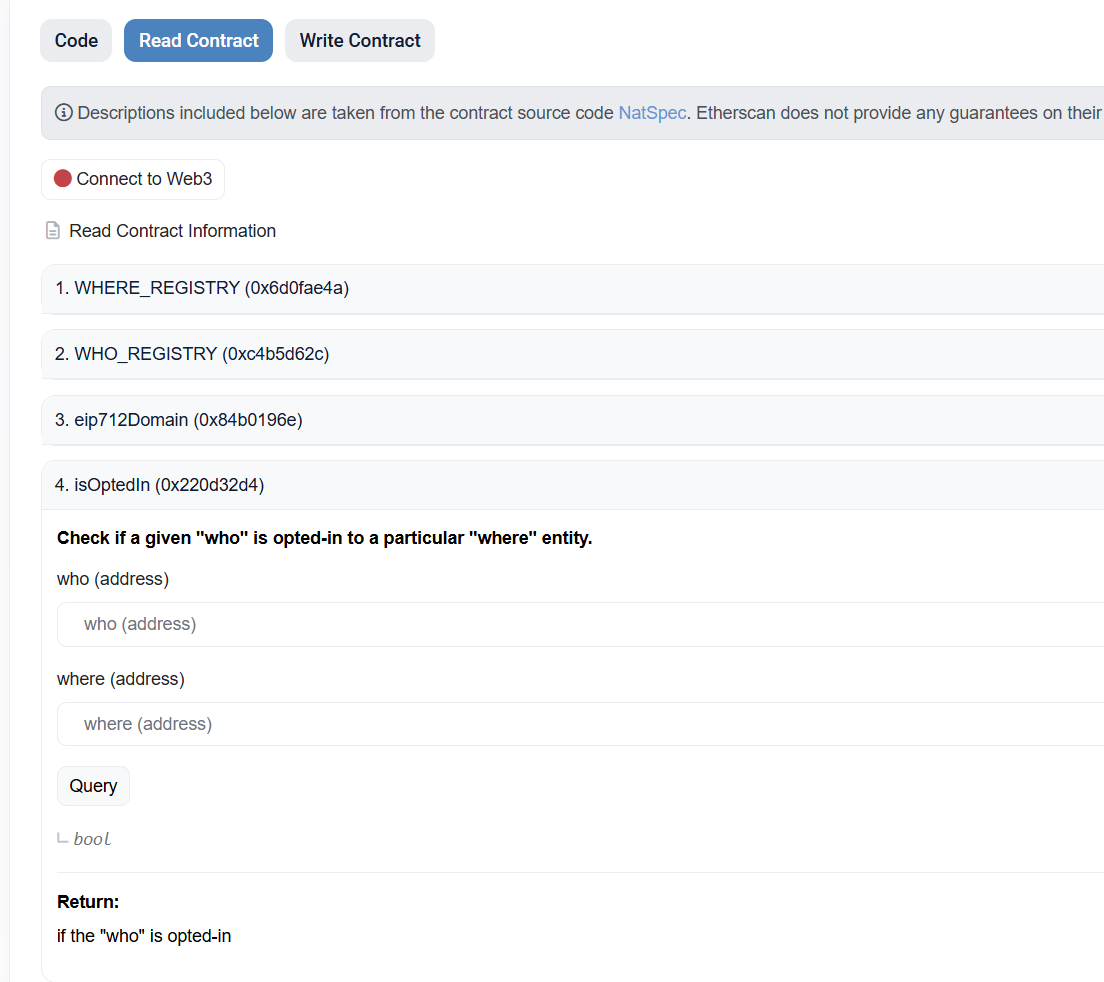
1. Open the "Read Contract" tab in the `OperatorNetworkOptInService` contract
2. Open the `isOptedIn()` method
3. Enter your `OPERATOR_ADDRESS` in the `who` parameter and `NETWORK_ADDRESS` in the `where` parameter
4. Click "Query" — it should return `True`
## Opt-in to Vault
### Using [Safe](https://app.safe.global/)
1. Open "Transaction builder"
2. Enter `OperatorVaultOptInService` as the contract address
3. Select the `optIn()` method
4. Enter the desired vault's address
5. Sign and send the transaction
### Verify via Etherscan
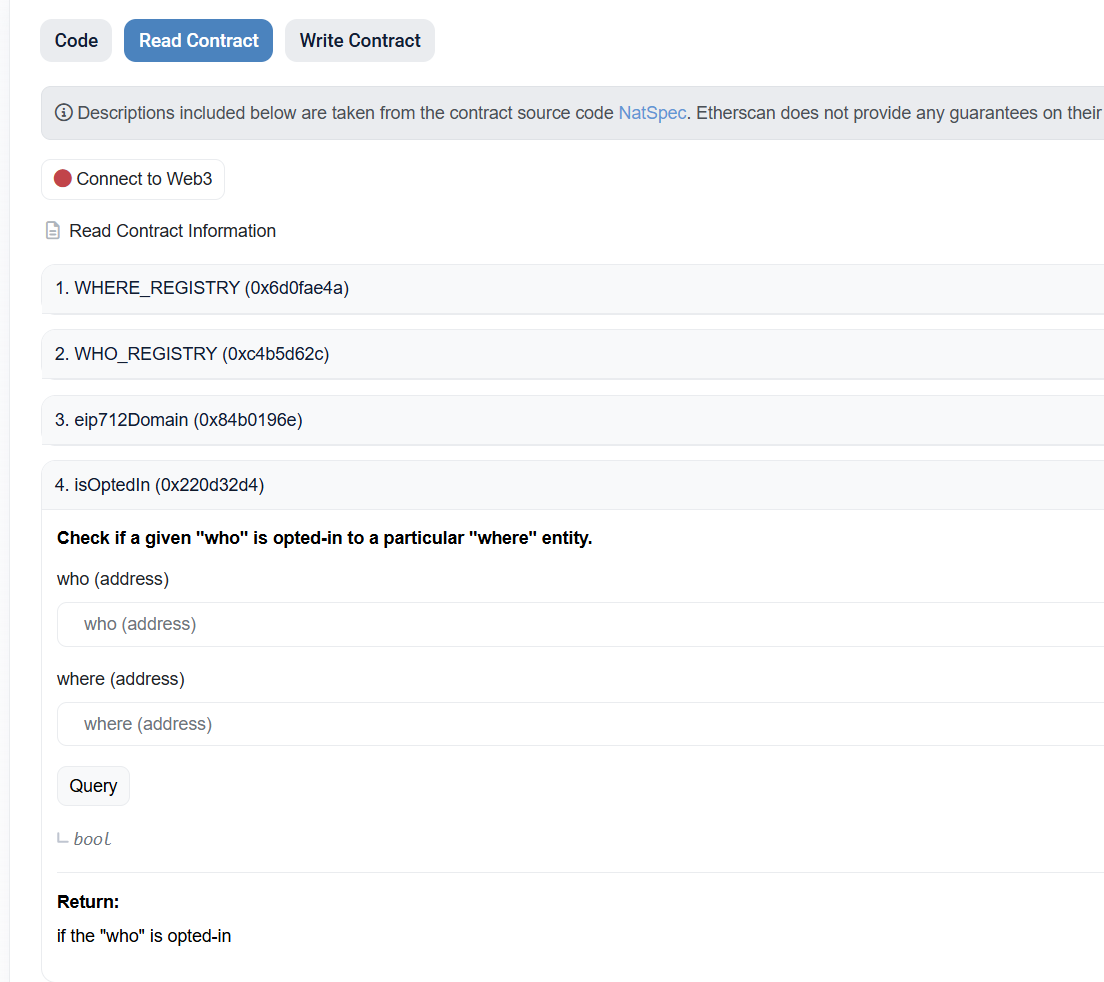
1. Open the "Read Contract" tab in the `OperatorVaultOptInService` contract
2. Open the `isOptedIn()` method
3. Enter your `OPERATOR_ADDRESS` in the `who` parameter and `VAULT_ADDRESS` in the `where` parameter
4. Click "Query" — it should return `True`
---
## /integrate/operators/register-operator
---
description: "Register your operator using the OperatorRegistry smart contract. The registered address serves as your management address for opting into vaults and networks..."
---
# Register Operator
Register your operator using the `OperatorRegistry` smart contract. The registered address serves as your management address for opting into vaults and networks to receive allocations.
## Using [Safe](https://app.safe.global/)
1. Open "Transaction builder"
2. Enter `OperatorRegistry` as the contract address
3. Select the `optIn()` method
4. Sign and send the transaction
## Verify Registration
Verify your registration on Etherscan:
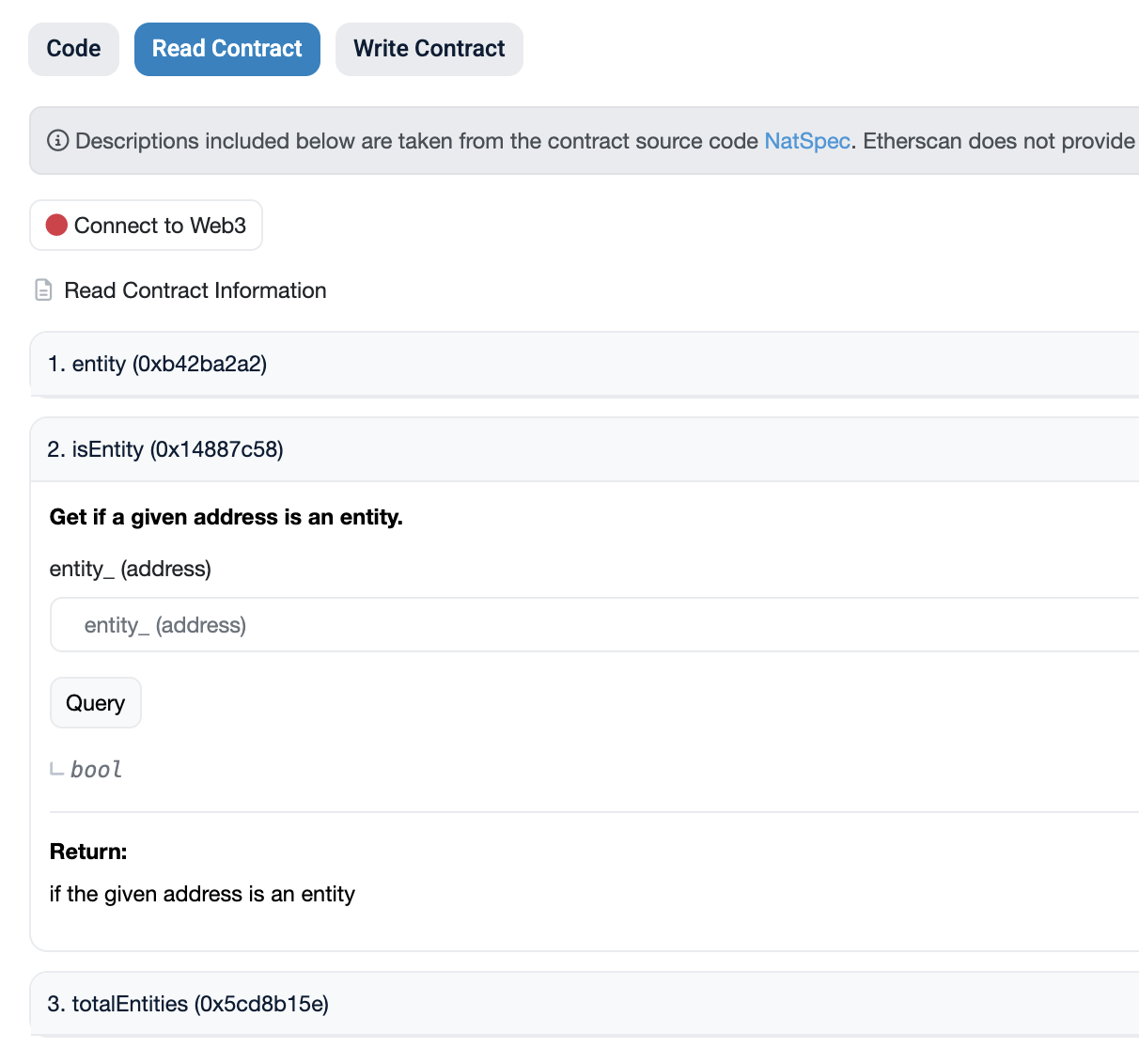
1. Open the "Read Contract" tab in the `OperatorRegistry` contract
2. Open the `isEntity()` method
3. Enter your `OPERATOR_ADDRESS` in the `account` parameter
4. Click "Query" — it should return `True`
---
## /integrate/operators/submit-metadata
---
description: "The Symbiotic UI displays TVL, allocations, and relationships between curators, vaults, operators, and networks. To make your entity visible on the UI, submit..."
---
# Submit Metadata
The [Symbiotic UI](https://app.symbiotic.fi/deposit) displays TVL, allocations, and relationships between curators, vaults, operators, and networks. To make your entity visible on the UI, submit its metadata to the corresponding repository.
After you submit metadata, the Symbiotic team reviews and merges it. Once merged, your data appears on the UI.
## Add a New Entity Template
### Choose a Repository
| Chain | URL |
| ------- | -------------------------------------------------------------------------------------------------- |
| Mainnet | [https://github.com/symbioticfi/metadata-mainnet](https://github.com/symbioticfi/metadata-mainnet) |
| Hoodi | [https://github.com/symbioticfi/metadata-hoodi](https://github.com/symbioticfi/metadata-hoodi) |
### Repository Structure
The repository is organized as follows:
```
repository/
├── vaults/
│ ├── 0x/
│ │ ├── info.json
│ │ └── logo.png (optional)
├── networks/
├── operators/
├── tokens/
```
Each entity is identified by its Ethereum address (`0x...`), and its data is stored in a folder named after the address. Inside this folder, include a file `info.json` containing metadata, and optionally, an icon file `logo.png`.
***
### Steps to Add a New Entity
**Note: After your PR is submitted, email your PR link to [verify@symbiotic.fi](mailto\:verify@symbiotic.fi) from your official business email (domain must match that of your entity website) to allow us to confirm your identity ahead of merging your PR.**
1. **Determine the entity type**:
- Decide whether the entity belongs to `vaults`, `networks`, `operators`, `tokens` or `points`.
- If the entity is a `vault`, ensure its collateral token entity is registered in the `tokens` folder before adding the vault metadata. If not, add the token first.
2. **Register the entity in the registry**:
- Before adding metadata for vaults, networks, or operators, ensure that they are registered in their respective registries. You can find the current registry contract addresses in the [Addresses page](/get-started/resources/addresses). Unregistered entities will not be accepted.
3. **Create a new folder**:
- Navigate to the appropriate directory for the entity type.
- Create a folder named after the Ethereum address (e.g., `0x1234567890abcdef1234567890abcdef12345678`).
4. **Add the `info.json` file**:
- Include metadata in the specified format (see below).
5. **(Optional) Add an icon file**:
- If available, include a `logo.png` file with the entity’s logo.
The Symbiotic team reviews your PR after automated checks pass. If approved, it will be merged into the repository.
***
### File Format: `info.json`
The `info.json` file must follow this structure:
#### Required Fields
- `name` (string): The name of the entity.
- `description` (string): A brief description of the entity.
- `tags` (array of strings): Tags categorizing the entity.
- `links` (array of objects): External links related to the entity.
#### Supported `links` Types
Each link should include:
- `type`: The type of the link. Supported values are:
- `website`: The official website of the entity.
- `explorer`: A blockchain explorer link for the entity's Ethereum address or contract.
- `docs`: Documentation related to the entity.
- `example`: Example use cases or tutorials.
- `externalLink`: A link to be shown below the entity's name.
- `name`: A user-friendly name for the link.
- `url`: The URL of the resource.
### Icon File: `logo.png` (Optional)
If you want to include an icon for the entity, follow these guidelines:
- **File Name**: `logo.png`
- **Dimensions**: 256x256 pixels
- **Format**: PNG
Place the `logo.png` file in the same folder as the `info.json` file.
***
### Validation
Before submitting your PR, ensure the following:
1. The Ethereum address is valid:
- It must start with `0x` and be exactly 42 characters long.
2. The `info.json` file is valid:
- Use a JSON validator, such as [https://jsonlint.com/](https://jsonlint.com/).
3. The `logo.png` file (if included) meets the size requirement of **256x256 pixels**.
***
### Submitting the Pull Request
Once your files are added to the repository, create a Pull Request with the following details:
1. **Entity Type**: Specify the type (vault, network, operator, token).
2. **Ethereum Address**: Provide the address of the entity.
3. **Description**: Summarize the entity’s purpose and data.
#### Example PR Description
```
Added new token entity: 0x1234567890abcdef1234567890abcdef12345678
- **Name**: USDT
- **Description**: USDT is a stablecoin pegged to the US Dollar, widely used for trading and liquidity in cryptocurrency markets.
- **Tags**: stablecoin, usdt
- **Links**:
- [Website](https://tether.to/)
- [Etherscan](https://etherscan.io/token/0xdac17f958d2ee523a2206206994597c13d831ec7)
- [Tether Documentation](https://docs.tether.to/)
- **CMC ID**: 825
- **Permit Name**: USDT Permit Token
- **Permit Version**: 1
- **Icon**: Included (256x256 px)
```
***
### Review and Approval
Your PR will be reviewed to ensure:
- The `info.json` file has all required fields and valid data.
- The `logo.png` file (if included) meets the requirements.
- The metadata is accurate and well-structured.
- The submitter of the PR is from the entity in question (verified via an email with your PR link to [verify@symbiotic.fi](mailto\:verify@symbiotic.fi) from your official business email)
After approval, your changes will be merged into the repository.
## Add an Operator
:::steps
##### Create a new folder in the `/operators` directory
##### Create a new json file in the folder with the following structure:
```json [info.json]
{
"name": "My Operator",
"description": "My Operator",
"tags": ["operator"],
"links": [{ "type": "website", "name": "Website", "url": "https://myoperator.com" }]
}
```
##### Save a logo of the Operator to `logo.png` of 256x256 pixels size
:::