---
## /integrate/curators/deploy-vault
---
description: "Symbiotic is a highly modular protocol with many separate parts and more coming in the future. This guide describes possible vault deployment configurations."
---
import { Details } from "../../../components/Details";
import { Tabs, TabItem } from "../../../components/Tabs";
# Deploy Vault
Symbiotic is a highly modular protocol with many separate parts and more coming in the future. This guide describes possible vault deployment configurations.
## General-purpose deployment
To deploy a ready-to-go vault, first determine how it will be used:
1. As a very specific configuration inside some complex system of contracts that you design and create
2. As a very pure configuration with most parameters non-updatable that is difficult to manage in practice
3. **As some common configuration that may cover most of the use cases**
We choose the 3rd option. Follow these steps to get a production-ready configuration:
1. Deploy a **Burner Router** (a specific implementation of the Burner module)
2. Deploy **core modules such as Vault, Delegator, Slasher** using the deployed Burner Router address
3. Deploy **staker rewards** with the use of the Vault’s address got during the previous step
### 1. Burner Router
A burner is a contract that receives slashed collateral tokens. Symbiotic doesn't specify how funds are processed after slashing. Possible approaches include:
- Fully burn the funds (unwrap the underlying assets if needed)
- Redistribute to good operators
- Compensate the victims (in case of using the stake as a security deposit)
From our side, we provide:
- **DefaultBurners** - pure burner contracts for several ETH LSTs
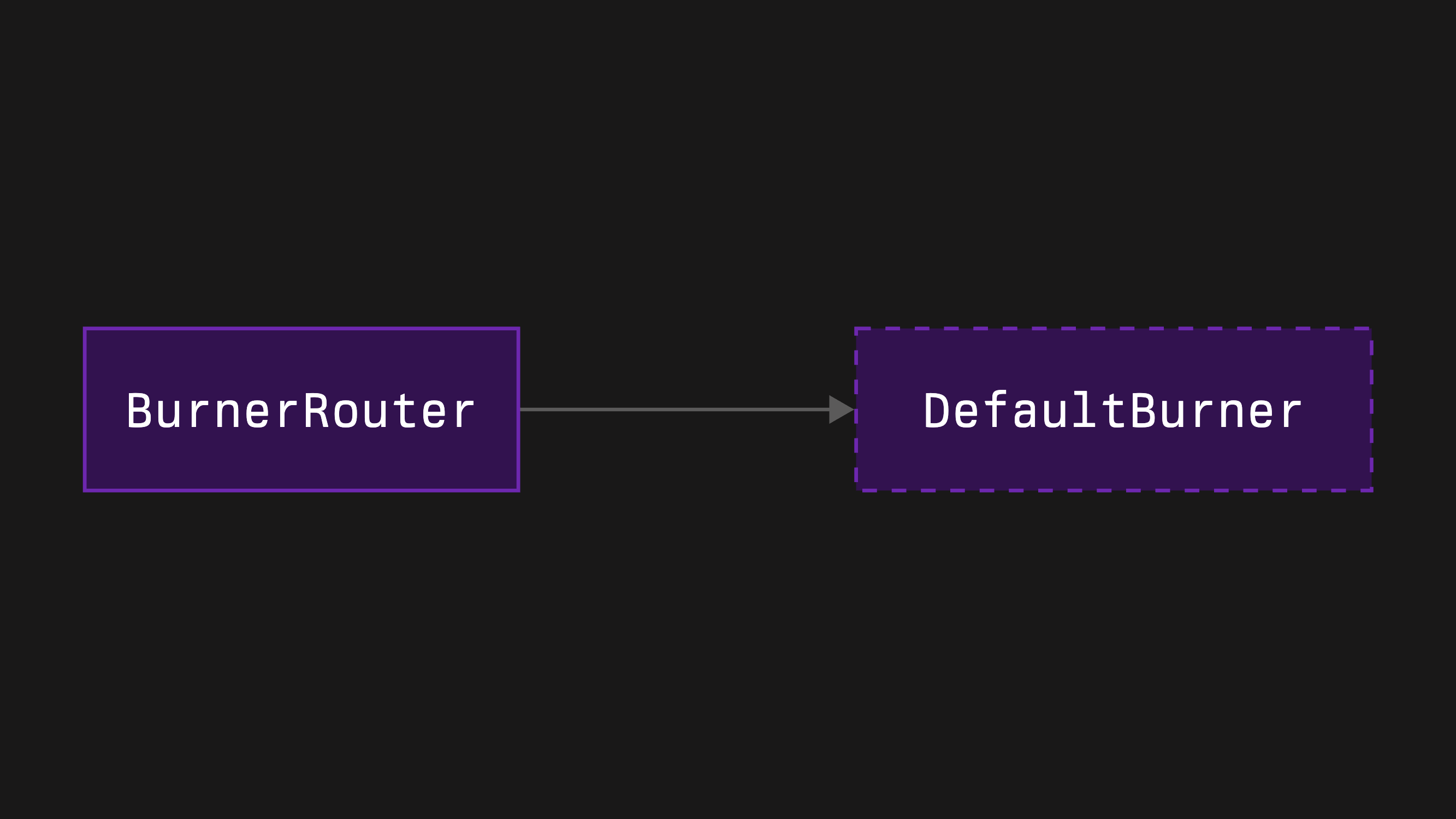
- **BurnerRouter** - a router contract that allows redirection of the slashed funds to different addresses depending on the slashing networks and the slashed operators
Our pure burners have one advantage and disadvantage: they are fully immutable, removing trust assumptions, but if the underlying LST's contracts upgrade, their flow may break. We recommend using **BurnerRouter**, which includes receiver update functionality, paired with a **DefaultBurner** as a global receiver.
1. Clone the burners repository by running the following command:
```bash [bash]
git clone --recurse-submodules https://github.com/symbioticfi/burners.git
```
2. Navigate into the cloned repository folder:
```bash [bash]
cd burners
```
3. Deploy a burner router contract using [a simple script](https://github.com/symbioticfi/burners/blob/main/script/deploy/BurnerRouter.s.sol):
:::note
This is an **example** command. Replace the given values with your own.
***
In addition, you need to [choose a preferred wallet option](https://book.getfoundry.sh/reference/forge/forge-script?highlight=forge%20script#wallet-options---raw) and adjust the command accordingly.
:::
```bash [bash]
OWNER=0xe8616DEcea16b5216e805B0b8caf7784de7570E7 # address of the router’s owner
COLLATERAL=0x7f39C581F595B53c5cb19bD0b3f8dA6c935E2Ca0 # address of the collateral - wstETH (MUST be the same as for the Vault to connect)
DELAY=1814400 # duration of the receivers’ update delay (= 21 days)
GLOBAL_RECEIVER=0xdCaC890b14121FD5D925E2589017Be68C2B5B324 # address of the pure burner corresponding to the collateral - wstETH_Burner (some collaterals are covered by us; see Deployments page)
NETWORK_RECEIVERS=[] # array with elements like "\(network_address,receiver_address\)" meaning network-specific receivers
OPERATOR_NETWORK_RECEIVERS=[] # array with elements like "\(network_address,operator_address,receiver_address\)" meaning operator-network-specific receivers
forge script script/deploy/BurnerRouter.s.sol:BurnerRouterScript \
$OWNER \
$COLLATERAL \
$DELAY \
$GLOBAL_RECEIVER \
$NETWORK_RECEIVERS \
$OPERATOR_NETWORK_RECEIVERS \
--sig "run(address,address,uint48,address,(address,address)[],(address,address,address)[])" \
--rpc-url=https://ethereum-rpc.publicnode.com \
--chain mainnet \
--broadcast
```
```bash [bash]
OWNER=0xe8616DEcea16b5216e805B0b8caf7784de7570E7 # address of the router’s owner
COLLATERAL=0x8d09a4502Cc8Cf1547aD300E066060D043f6982D # address of the collateral - wstETH (MUST be the same as for the Vault to connect)
DELAY=1814400 # duration of the receivers’ update delay (= 21 days)
GLOBAL_RECEIVER=0x25133c2c49A343F8312bb6e896C1ea0Ad8CD0EBd # address of the pure burner corresponding to the collateral - wstETH_Burner (some collaterals are covered by us; see Deployments page)
NETWORK_RECEIVERS=[] # array with elements like "\(network_address,receiver_address\)" meaning network-specific receivers
OPERATOR_NETWORK_RECEIVERS=[] # array with elements like "\(network_address,operator_address,receiver_address\)" meaning operator-network-specific receivers
forge script script/deploy/BurnerRouter.s.sol:BurnerRouterScript \
$OWNER \
$COLLATERAL \
$DELAY \
$GLOBAL_RECEIVER \
$NETWORK_RECEIVERS \
$OPERATOR_NETWORK_RECEIVERS \
--sig "run(address,address,uint48,address,(address,address)[],(address,address,address)[])" \
--rpc-url=https://ethereum-hoodi.gateway.tatum.io \
--chain hoodi \
--broadcast
```
```bash [bash]
OWNER=0xe8616DEcea16b5216e805B0b8caf7784de7570E7 # address of the router’s owner
COLLATERAL=0xB82381A3fBD3FaFA77B3a7bE693342618240067b # address of the collateral - wstETH (MUST be the same as for the Vault to connect)
DELAY=1814400 # duration of the receivers’ update delay (= 21 days)
GLOBAL_RECEIVER=0x58D347334A5E6bDE7279696abE59a11873294FA4 # address of the pure burner corresponding to the collateral - wstETH_Burner (some collaterals are covered by us; see Deployments page)
NETWORK_RECEIVERS=[] # array with elements like "\(network_address,receiver_address\)" meaning network-specific receivers
OPERATOR_NETWORK_RECEIVERS=[] # array with elements like "\(network_address,operator_address,receiver_address\)" meaning operator-network-specific receivers
forge script script/deploy/BurnerRouter.s.sol:BurnerRouterScript \
$OWNER \
$COLLATERAL \
$DELAY \
$GLOBAL_RECEIVER \
$NETWORK_RECEIVERS \
$OPERATOR_NETWORK_RECEIVERS \
--sig "run(address,address,uint48,address,(address,address)[],(address,address,address)[])" \
--rpc-url=https://ethereum-sepolia-rpc.publicnode.com \
--chain sepolia \
--broadcast
```
The following instruction assumes you have an already initialized Foundry repository ([read more here](https://book.getfoundry.sh/getting-started/first-steps)).
1. Install the burners repository by running the following command:
```bash [bash]
forge install symbioticfi/burners
```
2. Update (or create if not yet) a `remappings.txt` file inside your repository accordingly:
```txt title="remappings.txt"
...
@symbioticfi/burners/=lib/burners/
```
3. Create a burner router contract using [a BurnerRouterFactory contract](https://github.com/symbioticfi/burners/blob/main/src/contracts/router/BurnerRouterFactory.sol):
:::note
This is an **example** code snippet. Replace the given values with your own.
:::
```solidity [DeployBurnerRouter.s.sol]
import {IBurnerRouterFactory} from "@symbioticfi/burners/src/interfaces/router/IBurnerRouterFactory.sol";
import {IBurnerRouter} from "@symbioticfi/burners/src/interfaces/router/IBurnerRouter.sol";
// ...
address BURNER_ROUTER_FACTORY = 0x99F2B89fB3C363fBafD8d826E5AA77b28bAB70a0; // address of the BurnerRouterFactory (see Deployments page)
// ...
address burnerRouter = IBurnerRouterFactory(BURNER_ROUTER_FACTORY).create(
IBurnerRouter.InitParams({
owner: 0xe8616DEcea16b5216e805B0b8caf7784de7570E7, // address of the router’s owner
collateral: 0x7f39C581F595B53c5cb19bD0b3f8dA6c935E2Ca0, // address of the collateral - wstETH (MUST be the same as for the Vault to connect)
delay: 1814400, // duration of the receivers’ update delay (= 21 days)
globalReceiver: 0xdCaC890b14121FD5D925E2589017Be68C2B5B324, // address of the pure burner corresponding to the collateral - wstETH_Burner (some collaterals are covered by us; see Deployments page)
networkReceivers: new IBurnerRouter.NetworkReceiver[](0), // array with IBurnerRouter.NetworkReceiver elements meaning network-specific receivers
operatorNetworkReceivers: new IBurnerRouter.OperatorNetworkReceiver[](0) // array with IBurnerRouter.OperatorNetworkReceiver elements meaning network-specific receivers
})
);
// ...
```
```solidity [DeployBurnerRouter.s.sol]
import {IBurnerRouterFactory} from "@symbioticfi/burners/src/interfaces/router/IBurnerRouterFactory.sol";
import {IBurnerRouter} from "@symbioticfi/burners/src/interfaces/router/IBurnerRouter.sol";
// ...
address BURNER_ROUTER_FACTORY = 0xF619c99D166224B4AC008b14Cc67ac72C2E91D8a; // address of the BurnerRouterFactory (see Deployments page)
// ...
address burnerRouter = IBurnerRouterFactory(BURNER_ROUTER_FACTORY).create(
IBurnerRouter.InitParams({
owner: 0xe8616DEcea16b5216e805B0b8caf7784de7570E7, // address of the router’s owner
collateral: 0x8d09a4502Cc8Cf1547aD300E066060D043f6982D, // address of the collateral - wstETH (MUST be the same as for the Vault to connect)
delay: 1814400, // duration of the receivers’ update delay (= 21 days)
globalReceiver: 0x25133c2c49A343F8312bb6e896C1ea0Ad8CD0EBd, // address of the pure burner corresponding to the collateral - wstETH_Burner (some collaterals are covered by us; see Deployments page)
networkReceivers: new IBurnerRouter.NetworkReceiver[](0), // array with IBurnerRouter.NetworkReceiver elements meaning network-specific receivers
operatorNetworkReceivers: new IBurnerRouter.OperatorNetworkReceiver[](0) // array with IBurnerRouter.OperatorNetworkReceiver elements meaning network-specific receivers
})
);
// ...
```
```solidity [DeployBurnerRouter.s.sol]
import {IBurnerRouterFactory} from "@symbioticfi/burners/src/interfaces/router/IBurnerRouterFactory.sol";
import {IBurnerRouter} from "@symbioticfi/burners/src/interfaces/router/IBurnerRouter.sol";
// ...
address BURNER_ROUTER_FACTORY = 0x32e2AfbdAffB1e675898ABA75868d92eE1E68f3b; // address of the BurnerRouterFactory (see Deployments page)
// ...
address burnerRouter = IBurnerRouterFactory(BURNER_ROUTER_FACTORY).create(
IBurnerRouter.InitParams({
owner: 0xe8616DEcea16b5216e805B0b8caf7784de7570E7, // address of the router’s owner
collateral: 0xB82381A3fBD3FaFA77B3a7bE693342618240067b, // address of the collateral - wstETH (MUST be the same as for the Vault to connect)
delay: 1814400, // duration of the receivers’ update delay (= 21 days)
globalReceiver: 0x58D347334A5E6bDE7279696abE59a11873294FA4, // address of the pure burner corresponding to the collateral - wstETH_Burner (some collaterals are covered by us; see Deployments page)
networkReceivers: new IBurnerRouter.NetworkReceiver[](0), // array with IBurnerRouter.NetworkReceiver elements meaning network-specific receivers
operatorNetworkReceivers: new IBurnerRouter.OperatorNetworkReceiver[](0) // array with IBurnerRouter.OperatorNetworkReceiver elements meaning network-specific receivers
})
);
// ...
```
### 2. Core modules
#### Vault
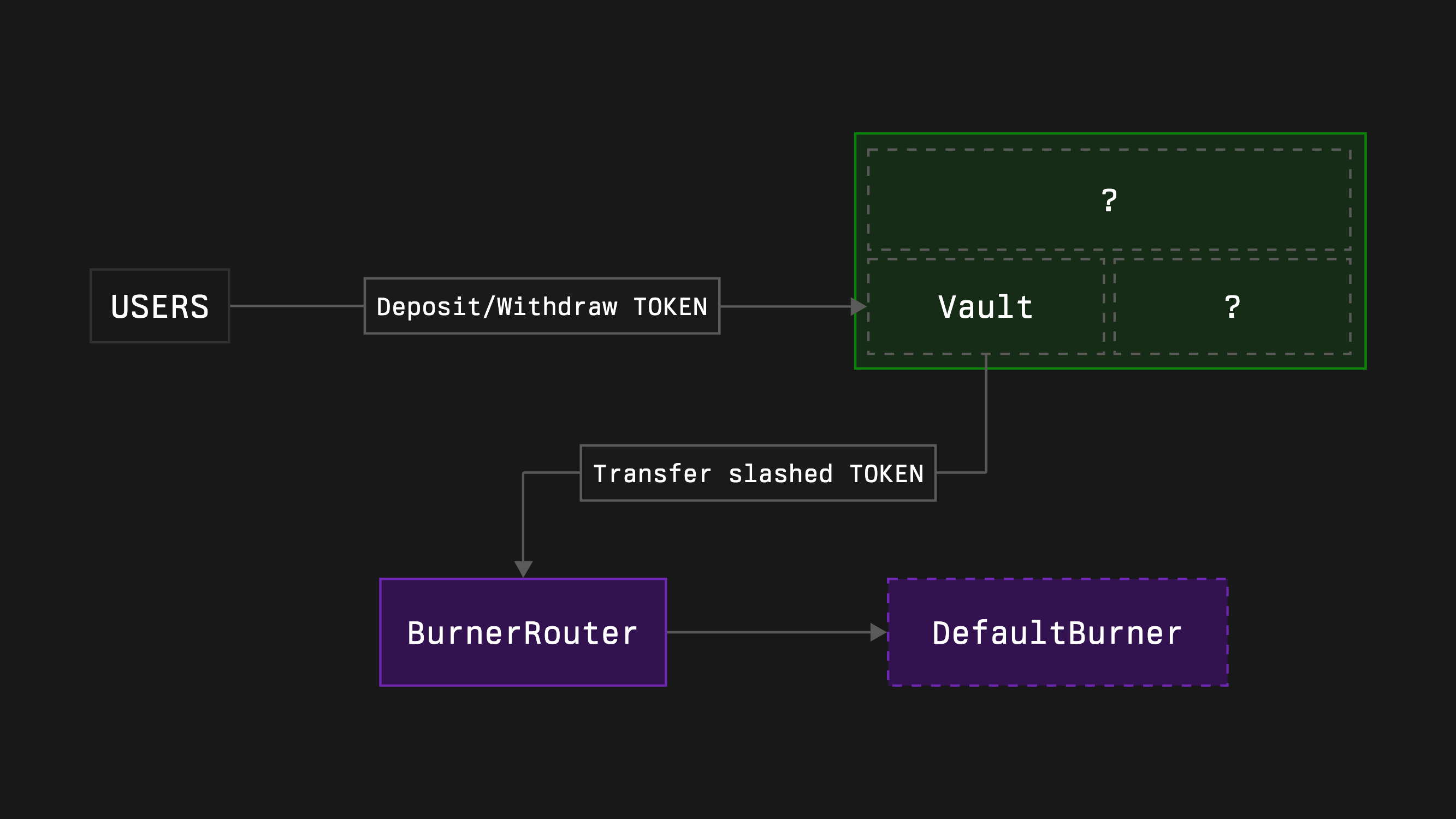
Vault is a contract that:
- storages the collateral
- performs accounting in the sense of deposits and withdrawals
- processes slashing events by transferring the collateral to the burner
- allows deposit whitelisting and deposit limiting
We provide two types of vaults:
1. **Vault (version 1)** - a standard version responsible for all the functions mentioned above
2. **Tokenized Vault (version 2)** - an extended version that represents stake shares as ERC-20 tokens
We don't need tokenization of the stake as LRTs provide it. Therefore, we'll use the common **Vault**.
:::info
You can also deploy a vault using our [form](https://app.symbiotic.fi/create).
:::
#### Delegator
A delegator is a contract that allows vault curators to allocate stake to networks and operators.
Currently, we have four types:
1. **NetworkRestakeDelegator (type 0)** - accounts for allocations in absolute numbers for networks and in shares for operator-network pairs, enabling staking and restaking across networks (depending on delegated amounts)
2. **FullRestakeDelegator (type 1)** - accounts for allocations in absolute numbers for both networks and operator-network pairs, enabling everything NetworkRestakeDelegator allows plus restaking across operators within networks
3. **OperatorSpecificDelegator (type 2)** - a simplified version of NetworkRestakeDelegator where only one specific operator has allocations
4. **OperatorNetworkSpecificDelegator (type 3)** - the simplest version where only one specific operator at one specific network has an allocation
FullRestakeDelegator covers all delegation use cases but can create highly risky configurations that need proper handling. OperatorSpecificDelegator limits use cases for LRTs with multiple operators, and OperatorNetworkSpecificDelegator has more limitations by design. We'll choose **NetworkRestakeDelegator** for our needs.
:::info
You can achieve a multi-operator single-network vault by using a Network-Restake delegator with a disabled NetworkLimitSet role
:::
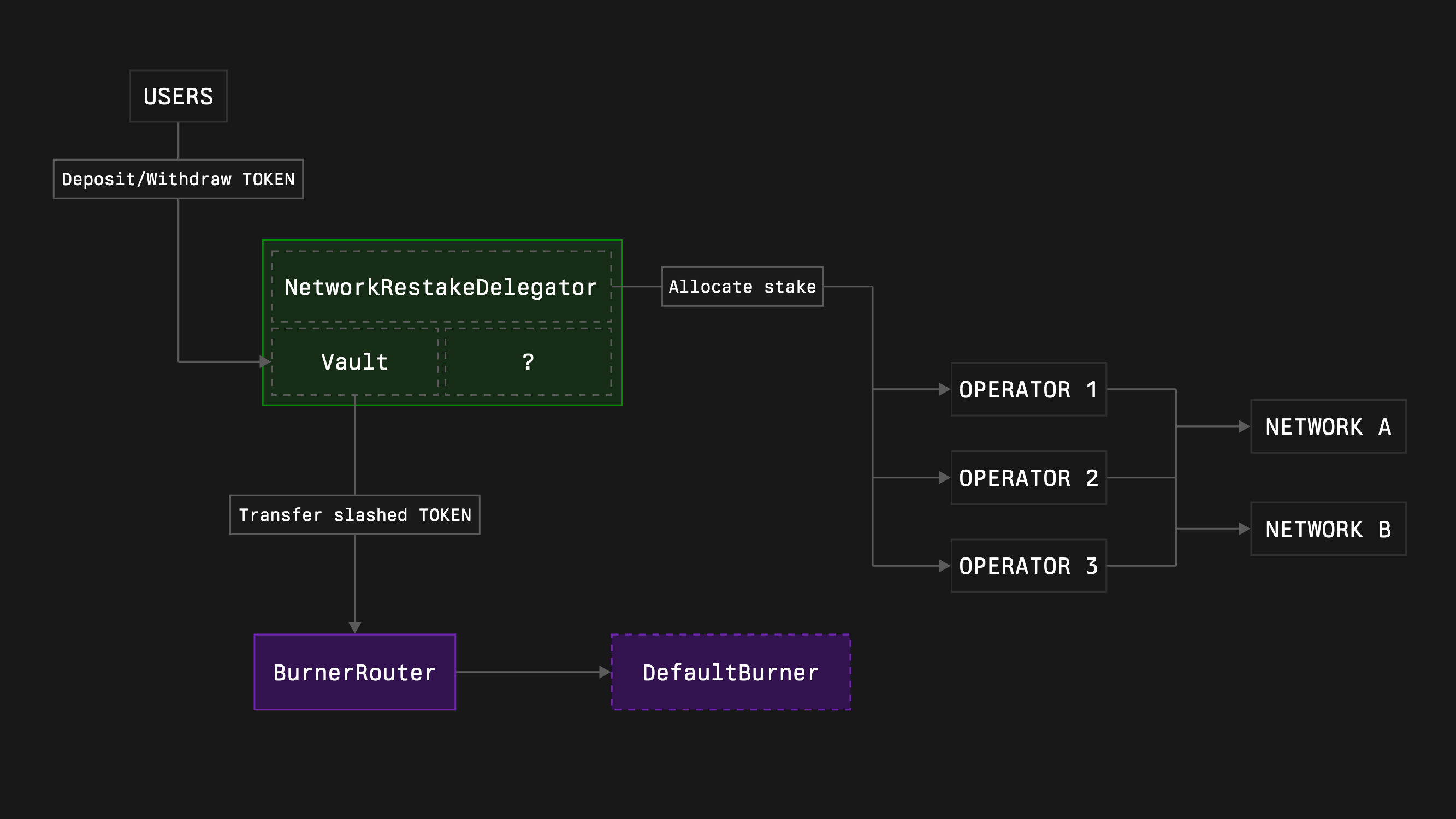
#### Slasher
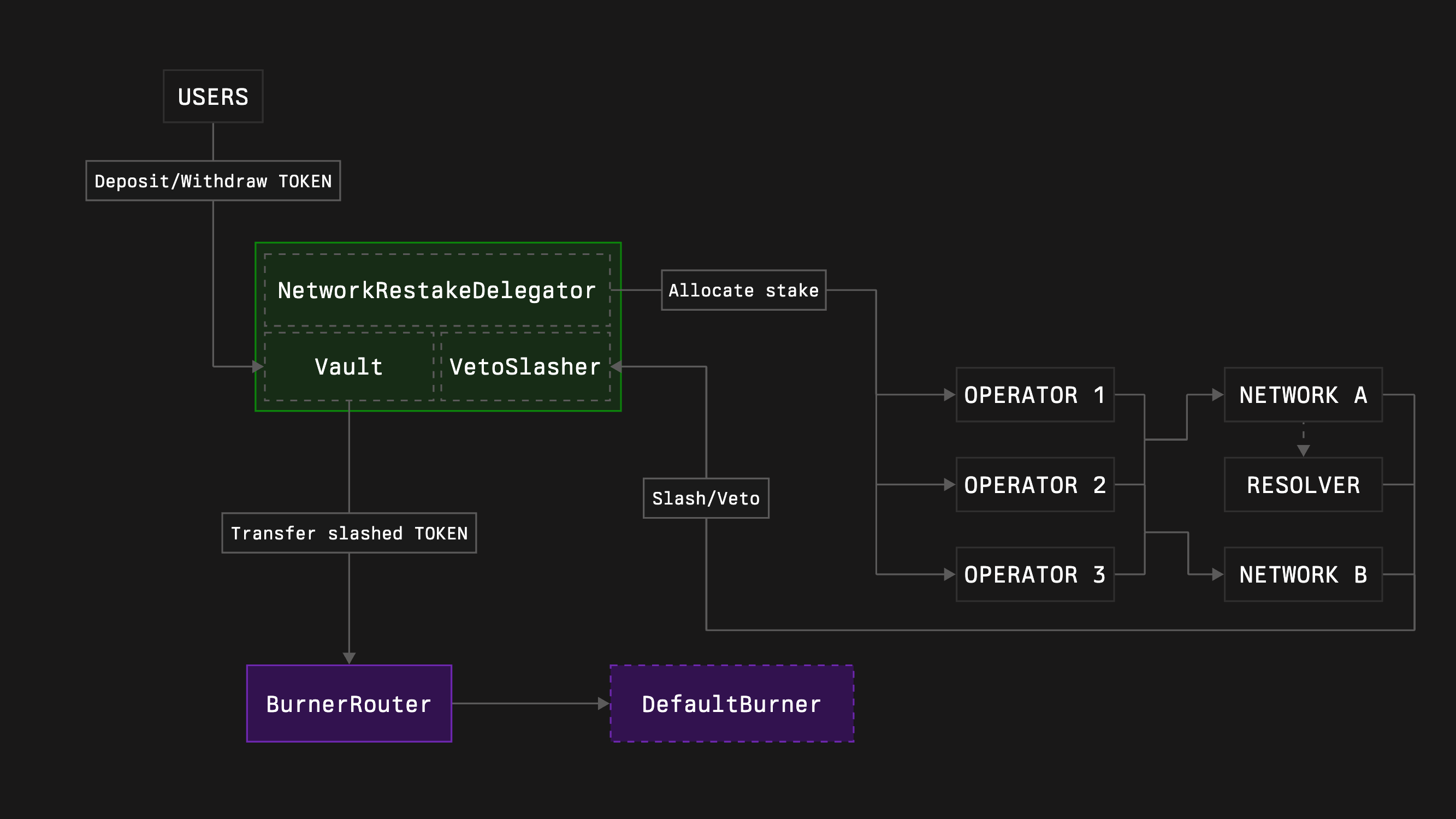
A Slasher is a contract responsible for proper penalty execution, preserving networks' rights to slash captured stake and stakers' rights not to be slashed more than deserved.
There are two types of slasher:
1. **Slasher (type 0)** - a common slasher that receives slashing requests and instantly executes them
2. **VetoSlasher (type 1)** - allows vetoing received slashing requests using resolvers
For VetoSlasher, networks may propose resolvers that can veto slashing requests. **Networks can also choose not to set a resolver, enabling an instant slashing mechanic similar to Slasher's.** If a vault curator isn't ready to provide stake without a resolver, the curator may simply not allocate any stake to such networks. Since **VetoSlasher** extends Slasher, we'll choose it.
1. Clone the core contracts repository by running the following command:
```bash [bash]
git clone --recurse-submodules https://github.com/symbioticfi/core.git
```
2. Navigate into the cloned repository folder:
```bash [bash]
cd core
```
3. Deploy core modules contracts using a simple script:
Open [DeployVault.s.sol](https://github.com/symbioticfi/core/blob/main/script/DeployVault.s.sol) and configure these settings:
```bash [bash]
// Address of the owner of the vault who can migrate the vault to new versions whitelisted by Symbiotic
address OWNER = 0x0000000000000000000000000000000000000000;
// Address of the collateral token
address COLLATERAL = 0x0000000000000000000000000000000000000000;
// Vault's burner to send slashed funds to (e.g., 0xdEaD or some unwrapper contract; not used in case of no slasher)
address BURNER = 0x000000000000000000000000000000000000dEaD;
// Duration of the vault epoch (the withdrawal delay for staker varies from EPOCH_DURATION to 2 * EPOCH_DURATION depending on when the withdrawal is requested)
uint48 EPOCH_DURATION = 7 days;
// Type of the delegator:
// 0. NetworkRestakeDelegator (allows restaking across multiple networks and having multiple operators per network)
// 1. FullRestakeDelegator (do not use without knowing what you are doing)
// 2. OperatorSpecificDelegator (allows restaking across multiple networks with only a single operator)
// 3. OperatorNetworkSpecificDelegator (allocates the stake to a specific operator and network)
uint64 DELEGATOR_INDEX = 0;
// Setting depending on the delegator type:
// 0. NetworkLimitSetRoleHolders (adjust allocations for networks)
// 1. NetworkLimitSetRoleHolders (adjust allocations for networks)
// 2. NetworkLimitSetRoleHolders (adjust allocations for networks)
// 3. network (the only network that will receive the stake; should be an array with a single element)
address[] NETWORK_ALLOCATION_SETTERS_OR_NETWORK = [0x0000000000000000000000000000000000000000];
// Setting depending on the delegator type:
// 0. OperatorNetworkSharesSetRoleHolders (adjust allocations for operators inside networks; in shares, resulting percentage is operatorShares / totalOperatorShares)
// 1. OperatorNetworkLimitSetRoleHolders (adjust allocations for operators inside networks; in shares, resulting percentage is operatorShares / totalOperatorShares)
// 2. operator (the only operator that will receive the stake; should be an array with a single element)
// 3. operator (the only operator that will receive the stake; should be an array with a single element)
address[] OPERATOR_ALLOCATION_SETTERS_OR_OPERATOR = [0x0000000000000000000000000000000000000000];
// Whether to deploy a slasher
bool WITH_SLASHER = true;
// Type of the slasher:
// 0. Slasher (allows instant slashing)
// 1. VetoSlasher (allows having a veto period if the resolver is set)
uint64 SLASHER_INDEX = 1;
// Duration of a veto period (should be less than EPOCH_DURATION)
uint48 VETO_DURATION = 1 days;
// Optional
// Deposit limit (maximum amount of the active stake allowed in the vault)
uint256 DEPOSIT_LIMIT = 0;
// Addresses of the whitelisted depositors
address[] WHITELISTED_DEPOSITORS = new address[](0);
// Address of the hook contract which, e.g., can automatically adjust the allocations on slashing events (not used in case of no slasher)
address HOOK = 0x0000000000000000000000000000000000000000;
// Delay in epochs for a network to update a resolver
uint48 RESOLVER_SET_EPOCHS_DELAY = 3;
```
Edit the configuration fields, then run:
```bash [bash]
forge script script/DeployVault.s.sol:DeployVaultScript \
--rpc-url=https://ethereum-rpc.publicnode.com \
--chain mainnet \
--broadcast
```
```bash [bash]
forge script script/DeployVault.s.sol:DeployVaultScript \
--rpc-url=https://0xrpc.io/hoodi \
--chain hoodi \
--broadcast
```
```bash [bash]
forge script script/DeployVault.s.sol:DeployVaultScript \
--rpc-url=https://ethereum-sepolia-rpc.publicnode.com \
--chain sepolia \
--broadcast
```
:::note
This is an **example** command. Replace the given values with your own.
***
In addition, you need to [choose a preferred wallet option](https://book.getfoundry.sh/reference/forge/forge-script?highlight=forge%20script#wallet-options---raw) and adjust the command accordingly.
:::
The following instruction assumes you have an already initialized Foundry repository ([read more here](https://book.getfoundry.sh/getting-started/first-steps)).
1. Install the core contracts repository by running the following command:
```bash [bash]
forge install symbioticfi/core
```
2. Update (or create if not yet) a `remappings.txt` file inside your repository accordingly:
```txt title="remappings.txt"
...
@symbioticfi/core/=lib/core/
```
3. Create core modules using [a VaultConfigurator contract](https://github.com/symbioticfi/core/blob/main/src/contracts/VaultConfigurator.sol):
:::note
This is an **example** code snippet. Replace the given values with your own.
:::
```solidity [DeployVault.s.sol]
import {IVaultConfigurator} from "@symbioticfi/core/src/interfaces/IVaultConfigurator.sol";
import {IVault} from "@symbioticfi/core/src/interfaces/vault/IVault.sol";
import {IBaseDelegator} from "@symbioticfi/core/src/interfaces/delegator/IBaseDelegator.sol";
import {INetworkRestakeDelegator} from "@symbioticfi/core/src/interfaces/delegator/INetworkRestakeDelegator.sol";
import {IBaseSlasher} from "@symbioticfi/core/src/interfaces/slasher/IBaseSlasher.sol";
import {IVetoSlasher} from "@symbioticfi/core/src/interfaces/slasher/IVetoSlasher.sol";
// ...
address VAULT_CONFIGURATOR = 0x29300b1d3150B4E2b12fE80BE72f365E200441EC; // address of the VaultConfigurator (see Deployments page)
// ...
address[] memory networkLimitSetRoleHolders = new address[](1);
networkLimitSetRoleHolders[0] = 0xe8616DEcea16b5216e805B0b8caf7784de7570E7;
address[] memory operatorNetworkSharesSetRoleHolders = new address[](1);
operatorNetworkSharesSetRoleHolders[0] = 0xe8616DEcea16b5216e805B0b8caf7784de7570E7;
(address vault, address networkRestakeDelegator, address vetoSlasher) = IVaultConfigurator(VAULT_CONFIGURATOR).create(
IVaultConfigurator.InitParams({
version: 1, // Vault’s version (= common one)
owner: 0xe8616DEcea16b5216e805B0b8caf7784de7570E7, // address of the Vault’s owner (can migrate the Vault to new versions in the future)
vaultParams: abi.encode(IVault.InitParams({
collateral: 0x7f39C581F595B53c5cb19bD0b3f8dA6c935E2Ca0, // address of the collateral - wstETH
burner: , // address of the deployed burner router
epochDuration: 604800, // duration of the Vault epoch in seconds (= 7 days)
depositWhitelist: false, // if enable deposit whitelisting
isDepositLimit: false, // if enable deposit limit
depositLimit: 0, // deposit limit
defaultAdminRoleHolder: 0xe8616DEcea16b5216e805B0b8caf7784de7570E7, // address of the Vault’s admin (can manage all roles)
depositWhitelistSetRoleHolder: 0xe8616DEcea16b5216e805B0b8caf7784de7570E7, // address of the enabler/disabler of the deposit whitelisting
depositorWhitelistRoleHolder: 0xe8616DEcea16b5216e805B0b8caf7784de7570E7, // address of the depositors whitelister
isDepositLimitSetRoleHolder: 0xe8616DEcea16b5216e805B0b8caf7784de7570E7, // address of the enabler/disabler of the deposit limit
depositLimitSetRoleHolder: 0xe8616DEcea16b5216e805B0b8caf7784de7570E7 // address of the deposit limit setter
})),
delegatorIndex: 0, // Delegator’s type (= NetworkRestakeDelegator)
delegatorParams: abi.encode(INetworkRestakeDelegator.InitParams({
baseParams: IBaseDelegator.BaseParams({
defaultAdminRoleHolder: 0xe8616DEcea16b5216e805B0b8caf7784de7570E7, // address of the Delegator’s admin (can manage all roles)
hook: 0x0000000000000000000000000000000000000000, // address of the hook (if not zero, receives onSlash() call on each slashing)
hookSetRoleHolder: 0xe8616DEcea16b5216e805B0b8caf7784de7570E7 // address of the hook setter
}),
networkLimitSetRoleHolders: networkLimitSetRoleHolders, // array of addresses of the network limit setters
operatorNetworkSharesSetRoleHolders: operatorNetworkSharesSetRoleHolders // array of addresses of the operator-network shares setters
})),
withSlasher: true, // if enable Slasher module
slasherIndex: 1, // Slasher’s type (= VetoSlasher)
slasherParams: abi.encode(IVetoSlasher.InitParams({
baseParams: IBaseSlasher.BaseParams({
isBurnerHook: true // if enable the `burner` to receive onSlash() call after each slashing (is needed for the burner router workflow)
}),
vetoDuration: 86400, // veto duration (= 1 day)
resolverSetEpochsDelay: 3 // number of Vault epochs needed for the resolver to be changed
}))
})
);
// ...
```
```solidity [DeployVault.s.sol]
import {IVaultConfigurator} from "@symbioticfi/core/src/interfaces/IVaultConfigurator.sol";
import {IVault} from "@symbioticfi/core/src/interfaces/vault/IVault.sol";
import {IBaseDelegator} from "@symbioticfi/core/src/interfaces/delegator/IBaseDelegator.sol";
import {INetworkRestakeDelegator} from "@symbioticfi/core/src/interfaces/delegator/INetworkRestakeDelegator.sol";
import {IBaseSlasher} from "@symbioticfi/core/src/interfaces/slasher/IBaseSlasher.sol";
import {IVetoSlasher} from "@symbioticfi/core/src/interfaces/slasher/IVetoSlasher.sol";
// ...
address VAULT_CONFIGURATOR = 0x94c344E816A53D07fC4c7F4a18f82b6Da87CFc8f; // address of the VaultConfigurator (see Deployments page)
// ...
address[] memory networkLimitSetRoleHolders = new address[](1);
networkLimitSetRoleHolders[0] = 0xe8616DEcea16b5216e805B0b8caf7784de7570E7;
address[] memory operatorNetworkSharesSetRoleHolders = new address[](1);
operatorNetworkSharesSetRoleHolders[0] = 0xe8616DEcea16b5216e805B0b8caf7784de7570E7;
(address vault, address networkRestakeDelegator, address vetoSlasher) = IVaultConfigurator(VAULT_CONFIGURATOR).create(
IVaultConfigurator.InitParams({
version: 1, // Vault’s version (= common one)
owner: 0xe8616DEcea16b5216e805B0b8caf7784de7570E7, // address of the Vault’s owner (can migrate the Vault to new versions in the future)
vaultParams: abi.encode(IVault.InitParams({
collateral: 0x8d09a4502Cc8Cf1547aD300E066060D043f6982D, // address of the collateral - wstETH
burner: , // address of the deployed burner router
epochDuration: 604800, // duration of the Vault epoch in seconds (= 7 days)
depositWhitelist: false, // if enable deposit whitelisting
isDepositLimit: false, // if enable deposit limit
depositLimit: 0, // deposit limit
defaultAdminRoleHolder: 0xe8616DEcea16b5216e805B0b8caf7784de7570E7, // address of the Vault’s admin (can manage all roles)
depositWhitelistSetRoleHolder: 0xe8616DEcea16b5216e805B0b8caf7784de7570E7, // address of the enabler/disabler of the deposit whitelisting
depositorWhitelistRoleHolder: 0xe8616DEcea16b5216e805B0b8caf7784de7570E7, // address of the depositors whitelister
isDepositLimitSetRoleHolder: 0xe8616DEcea16b5216e805B0b8caf7784de7570E7, // address of the enabler/disabler of the deposit limit
depositLimitSetRoleHolder: 0xe8616DEcea16b5216e805B0b8caf7784de7570E7 // address of the deposit limit setter
})),
delegatorIndex: 0, // Delegator’s type (= NetworkRestakeDelegator)
delegatorParams: abi.encode(INetworkRestakeDelegator.InitParams({
baseParams: IBaseDelegator.BaseParams({
defaultAdminRoleHolder: 0xe8616DEcea16b5216e805B0b8caf7784de7570E7, // address of the Delegator’s admin (can manage all roles)
hook: 0x0000000000000000000000000000000000000000, // address of the hook (if not zero, receives onSlash() call on each slashing)
hookSetRoleHolder: 0xe8616DEcea16b5216e805B0b8caf7784de7570E7 // address of the hook setter
}),
networkLimitSetRoleHolders: networkLimitSetRoleHolders, // array of addresses of the network limit setters
operatorNetworkSharesSetRoleHolders: operatorNetworkSharesSetRoleHolders // array of addresses of the operator-network shares setters
})),
withSlasher: true, // if enable Slasher module
slasherIndex: 1, // Slasher’s type (= VetoSlasher)
slasherParams: abi.encode(IVetoSlasher.InitParams({
baseParams: IBaseSlasher.BaseParams({
isBurnerHook: true // if enable the `burner` to receive onSlash() call after each slashing (is needed for the burner router workflow)
}),
vetoDuration: 86400, // veto duration (= 1 day)
resolverSetEpochsDelay: 3 // number of Vault epochs needed for the resolver to be changed
}))
})
);
// ...
```
```solidity [DeployVault.s.sol]
import {IVaultConfigurator} from "@symbioticfi/core/src/interfaces/IVaultConfigurator.sol";
import {IVault} from "@symbioticfi/core/src/interfaces/vault/IVault.sol";
import {IBaseDelegator} from "@symbioticfi/core/src/interfaces/delegator/IBaseDelegator.sol";
import {INetworkRestakeDelegator} from "@symbioticfi/core/src/interfaces/delegator/INetworkRestakeDelegator.sol";
import {IBaseSlasher} from "@symbioticfi/core/src/interfaces/slasher/IBaseSlasher.sol";
import {IVetoSlasher} from "@symbioticfi/core/src/interfaces/slasher/IVetoSlasher.sol";
// ...
address VAULT_CONFIGURATOR = 0xD2191FE92987171691d552C219b8caEf186eb9cA; // address of the VaultConfigurator (see Deployments page)
// ...
address[] memory networkLimitSetRoleHolders = new address[](1);
networkLimitSetRoleHolders[0] = 0xe8616DEcea16b5216e805B0b8caf7784de7570E7;
address[] memory operatorNetworkSharesSetRoleHolders = new address[](1);
operatorNetworkSharesSetRoleHolders[0] = 0xe8616DEcea16b5216e805B0b8caf7784de7570E7;
(address vault, address networkRestakeDelegator, address vetoSlasher) = IVaultConfigurator(VAULT_CONFIGURATOR).create(
IVaultConfigurator.InitParams({
version: 1, // Vault’s version (= common one)
owner: 0xe8616DEcea16b5216e805B0b8caf7784de7570E7, // address of the Vault’s owner (can migrate the Vault to new versions in the future)
vaultParams: abi.encode(IVault.InitParams({
collateral: 0xB82381A3fBD3FaFA77B3a7bE693342618240067b, // address of the collateral - wstETH
burner: , // address of the deployed burner router
epochDuration: 604800, // duration of the Vault epoch in seconds (= 7 days)
depositWhitelist: false, // if enable deposit whitelisting
isDepositLimit: false, // if enable deposit limit
depositLimit: 0, // deposit limit
defaultAdminRoleHolder: 0xe8616DEcea16b5216e805B0b8caf7784de7570E7, // address of the Vault’s admin (can manage all roles)
depositWhitelistSetRoleHolder: 0xe8616DEcea16b5216e805B0b8caf7784de7570E7, // address of the enabler/disabler of the deposit whitelisting
depositorWhitelistRoleHolder: 0xe8616DEcea16b5216e805B0b8caf7784de7570E7, // address of the depositors whitelister
isDepositLimitSetRoleHolder: 0xe8616DEcea16b5216e805B0b8caf7784de7570E7, // address of the enabler/disabler of the deposit limit
depositLimitSetRoleHolder: 0xe8616DEcea16b5216e805B0b8caf7784de7570E7 // address of the deposit limit setter
})),
delegatorIndex: 0, // Delegator’s type (= NetworkRestakeDelegator)
delegatorParams: abi.encode(INetworkRestakeDelegator.InitParams({
baseParams: IBaseDelegator.BaseParams({
defaultAdminRoleHolder: 0xe8616DEcea16b5216e805B0b8caf7784de7570E7, // address of the Delegator’s admin (can manage all roles)
hook: 0x0000000000000000000000000000000000000000, // address of the hook (if not zero, receives onSlash() call on each slashing)
hookSetRoleHolder: 0xe8616DEcea16b5216e805B0b8caf7784de7570E7 // address of the hook setter
}),
networkLimitSetRoleHolders: networkLimitSetRoleHolders, // array of addresses of the network limit setters
operatorNetworkSharesSetRoleHolders: operatorNetworkSharesSetRoleHolders // array of addresses of the operator-network shares setters
})),
withSlasher: true, // if enable Slasher module
slasherIndex: 1, // Slasher’s type (= VetoSlasher)
slasherParams: abi.encode(IVetoSlasher.InitParams({
baseParams: IBaseSlasher.BaseParams({
isBurnerHook: true // if enable the `burner` to receive onSlash() call after each slashing (is needed for the burner router workflow)
}),
vetoDuration: 86400, // veto duration (= 1 day)
resolverSetEpochsDelay: 3 // number of Vault epochs needed for the resolver to be changed
}))
})
);
// ...
```
### 3. Staker rewards
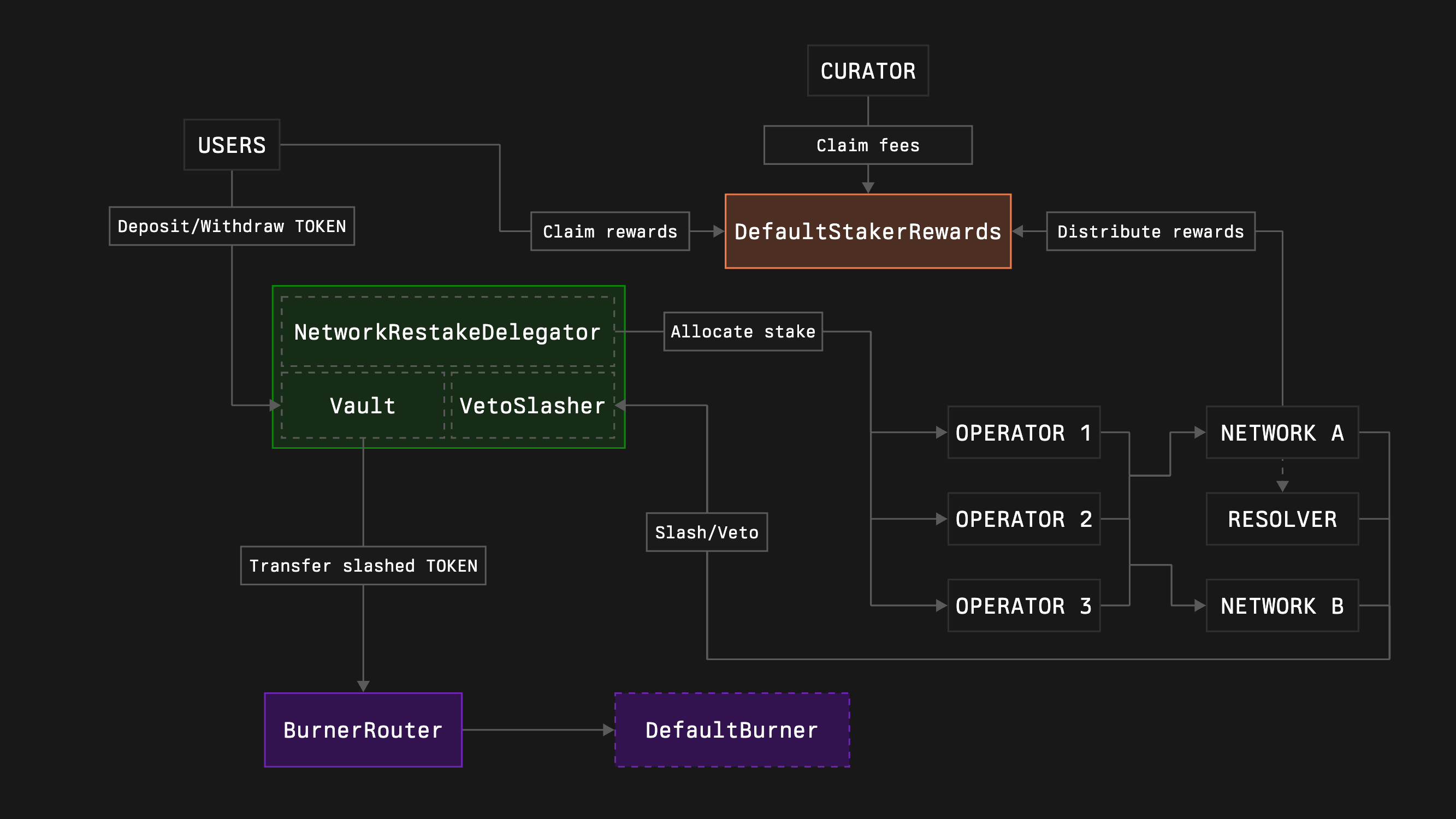
Rewards logic is not enshrined in the core contract, and we allow anyone to create their own implementations if needed. However, it requires resources like time, knowledge, and money. Therefore, we provide a default implementation of the staker rewards named **DefaultStakerRewards**. Its main goals are:
- allow networks to distribute rewards for the stakers of the certain Vault
- allow stakers to claim these rewards
- allow Vault curators to receive fees from the distributed rewards
This is the only staker rewards implementation we provide, so let's add it to our deployment configuration.
1. Clone the rewards contracts repository by running the following command:
```bash [bash]
git clone --recurse-submodules https://github.com/symbioticfi/rewards.git
```
2. Navigate into the cloned repository folder:
```bash [bash]
cd rewards
```
3. Deploy a staker rewards contract using [a simple script](https://github.com/symbioticfi/rewards/blob/main/script/deploy/DefaultStakerRewards.s.sol):
:::note
This is an **example** command. Replace the given values with your own.
***
In addition, you need to [choose a preferred wallet option](https://book.getfoundry.sh/reference/forge/forge-script?highlight=forge%20script#wallet-options---raw) and adjust the command accordingly.
:::
```bash [bash]
VAULT= # address of the deployed Vault
ADMIN_FEE=1000 # admin fee percent to get from all the rewards distributions (10% = 1_000 | 100% = 10_000)
ADMIN=0xe8616DEcea16b5216e805B0b8caf7784de7570E7 # address of the main admin (can manage all roles)
ADMIN_FEE_CLAIMER=0xe8616DEcea16b5216e805B0b8caf7784de7570E7 # address of the admin fee claimer
ADMIN_FEE_SETTER=0xe8616DEcea16b5216e805B0b8caf7784de7570E7 # address of the admin fee setter
forge script script/deploy/DefaultStakerRewards.s.sol:DefaultStakerRewardsScript \
$VAULT \
$ADMIN_FEE \
$ADMIN \
$ADMIN_FEE_CLAIMER \
$ADMIN_FEE_SETTER \
--sig "run(address,uint256,address,address,address)" \
--rpc-url=https://ethereum-rpc.publicnode.com \
--chain mainnet \
--broadcast
```
```bash [bash]
VAULT= # address of the deployed Vault
ADMIN_FEE=1000 # admin fee percent to get from all the rewards distributions (10% = 1_000 | 100% = 10_000)
ADMIN=0xe8616DEcea16b5216e805B0b8caf7784de7570E7 # address of the main admin (can manage all roles)
ADMIN_FEE_CLAIMER=0xe8616DEcea16b5216e805B0b8caf7784de7570E7 # address of the admin fee claimer
ADMIN_FEE_SETTER=0xe8616DEcea16b5216e805B0b8caf7784de7570E7 # address of the admin fee setter
forge script script/deploy/DefaultStakerRewards.s.sol:DefaultStakerRewardsScript \
$VAULT \
$ADMIN_FEE \
$ADMIN \
$ADMIN_FEE_CLAIMER \
$ADMIN_FEE_SETTER \
--sig "run(address,uint256,address,address,address)" \
--rpc-url=https://ethereum-hoodi.gateway.tatum.io \
--chain hoodi \
--broadcast
```
```bash [bash]
VAULT= # address of the deployed Vault
ADMIN_FEE=1000 # admin fee percent to get from all the rewards distributions (10% = 1_000 | 100% = 10_000)
ADMIN=0xe8616DEcea16b5216e805B0b8caf7784de7570E7 # address of the main admin (can manage all roles)
ADMIN_FEE_CLAIMER=0xe8616DEcea16b5216e805B0b8caf7784de7570E7 # address of the admin fee claimer
ADMIN_FEE_SETTER=0xe8616DEcea16b5216e805B0b8caf7784de7570E7 # address of the admin fee setter
forge script script/deploy/DefaultStakerRewards.s.sol:DefaultStakerRewardsScript \
$VAULT \
$ADMIN_FEE \
$ADMIN \
$ADMIN_FEE_CLAIMER \
$ADMIN_FEE_SETTER \
--sig "run(address,uint256,address,address,address)" \
--rpc-url=https://ethereum-sepolia-rpc.publicnode.com \
--chain sepolia \
--broadcast
```
The following instruction assumes you have an already initialized Foundry repository ([read more here](https://book.getfoundry.sh/getting-started/first-steps)).
1. Install the rewards contracts repository by running the following command:
```bash [bash]
forge install symbioticfi/rewards
```
2. Update (or create if not yet) a `remappings.txt` file inside your repository accordingly:
```txt title="remappings.txt"
...
@symbioticfi/rewards/=lib/rewards/
```
3. Create a staker rewards contract using [a DefaultStakerRewardsFactory contract](https://github.com/symbioticfi/rewards/blob/main/src/contracts/defaultStakerRewards/DefaultStakerRewardsFactory.sol):
:::note
It is an **example** code snippet, meaning you need to replace the given values with necessary ones.
:::
```solidity [DefaultStakerRewards.s.sol]
import {IDefaultStakerRewardsFactory} from "@symbioticfi/rewards/src/interfaces/defaultStakerRewards/IDefaultStakerRewardsFactory.sol";
import {IDefaultStakerRewards} from "@symbioticfi/rewards/src/interfaces/defaultStakerRewards/IDefaultStakerRewards.sol";
// ...
address DEFAULT_STAKER_REWARDS_FACTORY = 0x290CAB97a312164Ccf095d75D6175dF1C4A0a25F; // address of the DefaultStakerRewardsFactory (see Deployments page)
// ...
address defaultStakerRewards = IDefaultStakerRewardsFactory(DEFAULT_STAKER_REWARDS_FACTORY).create(IDefaultStakerRewards.InitParams({
vault: , // address of the deployed Vault
adminFee: 1000, // admin fee percent to get from all the rewards distributions (10% = 1_000 | 100% = 10_000)
defaultAdminRoleHolder: 0xe8616DEcea16b5216e805B0b8caf7784de7570E7, // address of the main admin (can manage all roles)
adminFeeClaimRoleHolder: 0xe8616DEcea16b5216e805B0b8caf7784de7570E7, // address of the admin fee claimer
adminFeeSetRoleHolder: 0xe8616DEcea16b5216e805B0b8caf7784de7570E7 // address of the admin fee setter
}));
// ...
```
```solidity [DefaultStakerRewards.s.sol]
import {IDefaultStakerRewardsFactory} from "@symbioticfi/rewards/src/interfaces/defaultStakerRewards/IDefaultStakerRewardsFactory.sol";
import {IDefaultStakerRewards} from "@symbioticfi/rewards/src/interfaces/defaultStakerRewards/IDefaultStakerRewards.sol";
// ...
address DEFAULT_STAKER_REWARDS_FACTORY = 0x698C36DE44D73AEfa3F0Ce3c0255A8667bdE7cFD; // address of the DefaultStakerRewardsFactory (see Deployments page)
// ...
address defaultStakerRewards = IDefaultStakerRewardsFactory(DEFAULT_STAKER_REWARDS_FACTORY).create(IDefaultStakerRewards.InitParams({
vault: , // address of the deployed Vault
adminFee: 1000, // admin fee percent to get from all the rewards distributions (10% = 1_000 | 100% = 10_000)
defaultAdminRoleHolder: 0xe8616DEcea16b5216e805B0b8caf7784de7570E7, // address of the main admin (can manage all roles)
adminFeeClaimRoleHolder: 0xe8616DEcea16b5216e805B0b8caf7784de7570E7, // address of the admin fee claimer
adminFeeSetRoleHolder: 0xe8616DEcea16b5216e805B0b8caf7784de7570E7 // address of the admin fee setter
}));
// ...
```
```solidity [DefaultStakerRewards.s.sol]
import {IDefaultStakerRewardsFactory} from "@symbioticfi/rewards/src/interfaces/defaultStakerRewards/IDefaultStakerRewardsFactory.sol";
import {IDefaultStakerRewards} from "@symbioticfi/rewards/src/interfaces/defaultStakerRewards/IDefaultStakerRewards.sol";
// ...
address DEFAULT_STAKER_REWARDS_FACTORY = 0x70C618a13D1A57f7234c0b893b9e28C5cA8E7f37; // address of the DefaultStakerRewardsFactory (see Deployments page)
// ...
address defaultStakerRewards = IDefaultStakerRewardsFactory(DEFAULT_STAKER_REWARDS_FACTORY).create(IDefaultStakerRewards.InitParams({
vault: , // address of the deployed Vault
adminFee: 1000, // admin fee percent to get from all the rewards distributions (10% = 1_000 | 100% = 10_000)
defaultAdminRoleHolder: 0xe8616DEcea16b5216e805B0b8caf7784de7570E7, // address of the main admin (can manage all roles)
adminFeeClaimRoleHolder: 0xe8616DEcea16b5216e805B0b8caf7784de7570E7, // address of the admin fee claimer
adminFeeSetRoleHolder: 0xe8616DEcea16b5216e805B0b8caf7784de7570E7 // address of the admin fee setter
}));
// ...
```
## Advanced
### Network-specific burners
The further text describes extended configurations that may bring risk reductions, wider support of the networks, and more capital efficiency for users.
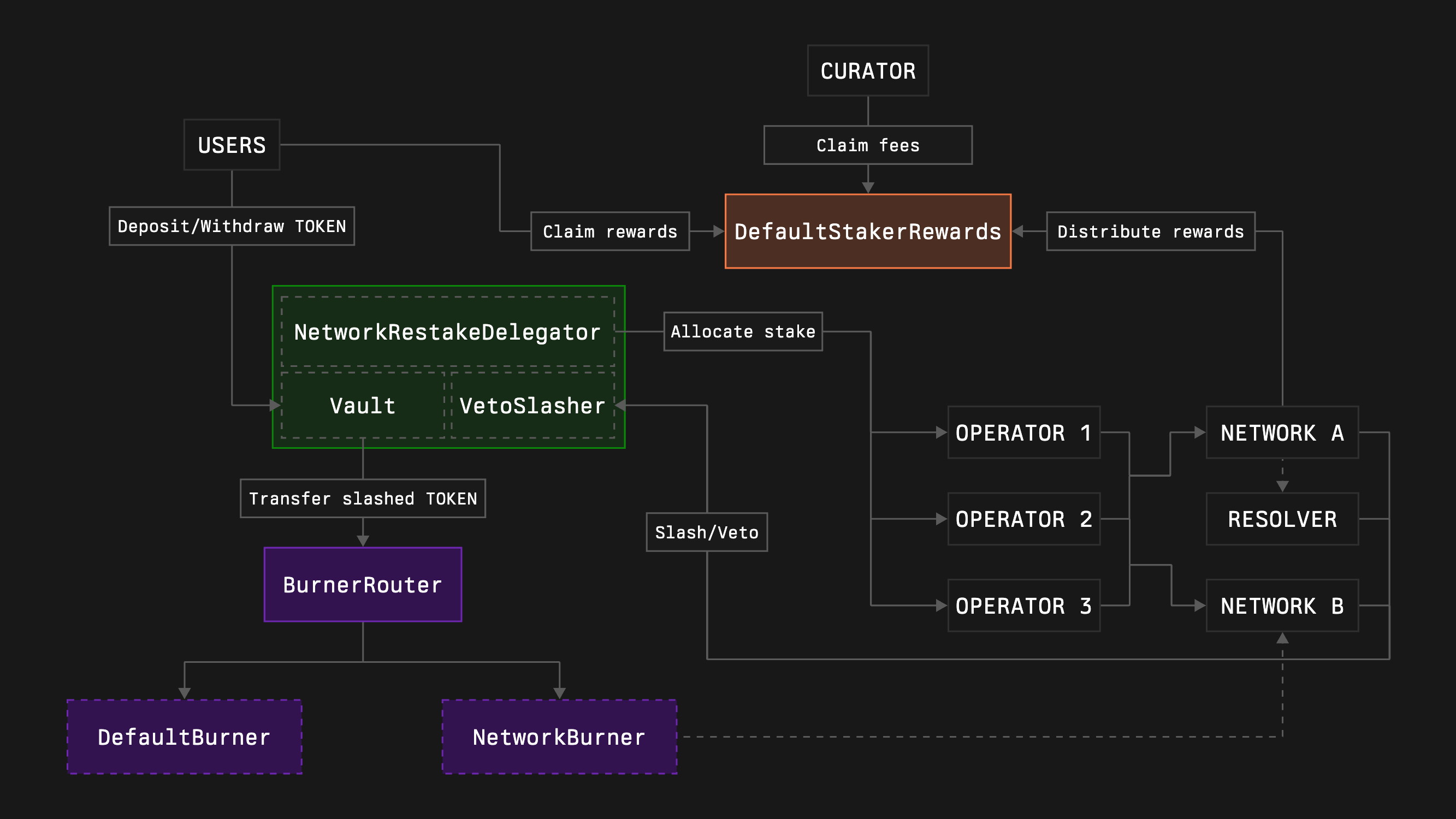
Such a case is possible:
- A vault typically wants slashed funds to be burnt.
- Alternatively, a highly reputable network wants its slashings redistributed to users who could suffer losses due to operators' malicious activity.
- The vault decides to integrate such a network to increase its capital efficiency.
Currently, our configuration doesn't contain such logic, but it already supports it. [As mentioned earlier](#1-burner-router), **BurnerRouter** allows splitting slashed funds across any number of receivers depending on the slashing networks and slashed operators. Given the network address that needs this functionality and the burner address to send funds to, you can either configure this behavior using an existing burner router or handle it during deployment.
:::warning
Burning slashed funds is one of the safest approaches. Any other methodology for processing slashed funds may create incentives for different parties to trigger slashing, depending on many factors.
:::
1. Clone the burners repository by running the following command:
```bash [bash]
git clone --recurse-submodules https://github.com/symbioticfi/burners.git
```
2. Navigate into the cloned repository folder:
```bash [bash]
cd burners
```
3. Deploy a burner router contract with a preconfigured network-specific burner using [a simple script](https://github.com/symbioticfi/burners/blob/main/script/deploy/BurnerRouter.s.sol):
:::note
This is an **example** command. Replace the given values with your own.
***
In addition, you need to [choose a preferred wallet option](https://book.getfoundry.sh/reference/forge/forge-script?highlight=forge%20script#wallet-options---raw) and adjust the command accordingly.
:::
```bash [bash]
OWNER=0xe8616DEcea16b5216e805B0b8caf7784de7570E7 # address of the router’s owner
COLLATERAL=0x7f39C581F595B53c5cb19bD0b3f8dA6c935E2Ca0 # address of the collateral - wstETH (MUST be the same as for the Vault to connect)
DELAY=1814400 # duration of the receivers’ update delay (= 21 days)
GLOBAL_RECEIVER=0xdCaC890b14121FD5D925E2589017Be68C2B5B324 # address of the pure burner corresponding to the collateral - wstETH_Burner (some collaterals are covered by us; see Deployments page)
NETWORK_RECEIVERS=[\(,\)] # array with elements like "\(network_address,receiver_address\)" meaning network-specific receivers
OPERATOR_NETWORK_RECEIVERS=[] # array with elements like "\(network_address,operator_address,receiver_address\)" meaning operator-network-specific receivers
forge script script/deploy/BurnerRouter.s.sol:BurnerRouterScript \
$OWNER \
$COLLATERAL \
$DELAY \
$GLOBAL_RECEIVER \
$NETWORK_RECEIVERS \
$OPERATOR_NETWORK_RECEIVERS \
--sig "run(address,address,uint48,address,(address,address)[],(address,address,address)[])" \
--rpc-url=https://ethereum-rpc.publicnode.com \
--chain mainnet \
--broadcast
```
```bash [bash]
OWNER=0xe8616DEcea16b5216e805B0b8caf7784de7570E7 # address of the router’s owner
COLLATERAL=0x8d09a4502Cc8Cf1547aD300E066060D043f6982D # address of the collateral - wstETH (MUST be the same as for the Vault to connect)
DELAY=1814400 # duration of the receivers’ update delay (= 21 days)
GLOBAL_RECEIVER=0x25133c2c49A343F8312bb6e896C1ea0Ad8CD0EBd # address of the pure burner corresponding to the collateral - wstETH_Burner (some collaterals are covered by us; see Deployments page)
NETWORK_RECEIVERS=[\(,\)] # array with elements like "\(network_address,receiver_address\)" meaning network-specific receivers
OPERATOR_NETWORK_RECEIVERS=[] # array with elements like "\(network_address,operator_address,receiver_address\)" meaning operator-network-specific receivers
forge script script/deploy/BurnerRouter.s.sol:BurnerRouterScript \
$OWNER \
$COLLATERAL \
$DELAY \
$GLOBAL_RECEIVER \
$NETWORK_RECEIVERS \
$OPERATOR_NETWORK_RECEIVERS \
--sig "run(address,address,uint48,address,(address,address)[],(address,address,address)[])" \
--rpc-url=https://ethereum-hoodi.gateway.tatum.io \
--chain hoodi \
--broadcast
```
```bash [bash]
OWNER=0xe8616DEcea16b5216e805B0b8caf7784de7570E7 # address of the router’s owner
COLLATERAL=0xB82381A3fBD3FaFA77B3a7bE693342618240067b # address of the collateral - wstETH (MUST be the same as for the Vault to connect)
DELAY=1814400 # duration of the receivers’ update delay (= 21 days)
GLOBAL_RECEIVER=0x58D347334A5E6bDE7279696abE59a11873294FA4 # address of the pure burner corresponding to the collateral - wstETH_Burner (some collaterals are covered by us; see Deployments page)
NETWORK_RECEIVERS=[\(,\)] # array with elements like "\(network_address,receiver_address\)" meaning network-specific receivers
OPERATOR_NETWORK_RECEIVERS=[] # array with elements like "\(network_address,operator_address,receiver_address\)" meaning operator-network-specific receivers
forge script script/deploy/BurnerRouter.s.sol:BurnerRouterScript \
$OWNER \
$COLLATERAL \
$DELAY \
$GLOBAL_RECEIVER \
$NETWORK_RECEIVERS \
$OPERATOR_NETWORK_RECEIVERS \
--sig "run(address,address,uint48,address,(address,address)[],(address,address,address)[])" \
--rpc-url=https://ethereum-sepolia-rpc.publicnode.com \
--chain sepolia \
--broadcast
```
The following instruction assumes you have an already initialized Foundry repository ([read more here](https://book.getfoundry.sh/getting-started/first-steps)).
1. Install the burners repository by running the following command:
```bash [bash]
forge install symbioticfi/burners
```
2. Update (or create if not yet) a `remappings.txt` file inside your repository accordingly:
```txt title="remappings.txt"
...
@symbioticfi/burners/=lib/burners/
```
3. Create a burner router contract using [a BurnerRouterFactory contract](https://github.com/symbioticfi/burners/blob/main/src/contracts/router/BurnerRouterFactory.sol):
:::note
This is an **example** code snippet. Replace the given values with your own.
:::
```solidity [DeployBurnerRouter.s.sol]
import {IBurnerRouterFactory} from "@symbioticfi/burners/src/interfaces/router/IBurnerRouterFactory.sol";
import {IBurnerRouter} from "@symbioticfi/burners/src/interfaces/router/IBurnerRouter.sol";
// ...
address BURNER_ROUTER_FACTORY = 0x99F2B89fB3C363fBafD8d826E5AA77b28bAB70a0; // address of the BurnerRouterFactory (see Deployments page)
// ...
IBurnerRouter.NetworkReceiver[] memory networkReceivers = new IBurnerRouter.NetworkReceiver[](1);
networkReceivers[0] = IBurnerRouter.NetworkReceiver({
network: ,
receiver:
});
address burnerRouter = IBurnerRouterFactory(BURNER_ROUTER_FACTORY).create(
IBurnerRouter.InitParams({
owner: 0xe8616DEcea16b5216e805B0b8caf7784de7570E7, // address of the router’s owner
collateral: 0x7f39C581F595B53c5cb19bD0b3f8dA6c935E2Ca0, // address of the collateral - wstETH (MUST be the same as for the Vault to connect)
delay: 1814400, // duration of the receivers’ update delay (= 21 days)
globalReceiver: 0xdCaC890b14121FD5D925E2589017Be68C2B5B324, // address of the pure burner corresponding to the collateral - wstETH_Burner (some collaterals are covered by us; see Deployments page)
networkReceivers: networkReceivers, // array with IBurnerRouter.NetworkReceiver elements meaning network-specific receivers
operatorNetworkReceivers: new IBurnerRouter.OperatorNetworkReceiver[](0) // array with IBurnerRouter.OperatorNetworkReceiver elements meaning network-specific receivers
})
);
// ...
```
```solidity [DeployBurnerRouter.s.sol]
import {IBurnerRouterFactory} from "@symbioticfi/burners/src/interfaces/router/IBurnerRouterFactory.sol";
import {IBurnerRouter} from "@symbioticfi/burners/src/interfaces/router/IBurnerRouter.sol";
// ...
address BURNER_ROUTER_FACTORY = 0xF619c99D166224B4AC008b14Cc67ac72C2E91D8a; // address of the BurnerRouterFactory (see Deployments page)
// ...
IBurnerRouter.NetworkReceiver[] memory networkReceivers = new IBurnerRouter.NetworkReceiver[](1);
networkReceivers[0] = IBurnerRouter.NetworkReceiver({
network: ,
receiver:
});
address burnerRouter = IBurnerRouterFactory(BURNER_ROUTER_FACTORY).create(
IBurnerRouter.InitParams({
owner: 0xe8616DEcea16b5216e805B0b8caf7784de7570E7, // address of the router’s owner
collateral: 0x8d09a4502Cc8Cf1547aD300E066060D043f6982D, // address of the collateral - wstETH (MUST be the same as for the Vault to connect)
delay: 1814400, // duration of the receivers’ update delay (= 21 days)
globalReceiver: 0x25133c2c49A343F8312bb6e896C1ea0Ad8CD0EBd, // address of the pure burner corresponding to the collateral - wstETH_Burner (some collaterals are covered by us; see Deployments page)
networkReceivers: networkReceivers, // array with IBurnerRouter.NetworkReceiver elements meaning network-specific receivers
operatorNetworkReceivers: new IBurnerRouter.OperatorNetworkReceiver[](0) // array with IBurnerRouter.OperatorNetworkReceiver elements meaning network-specific receivers
})
);
// ...
```
```solidity [DeployBurnerRouter.s.sol]
import {IBurnerRouterFactory} from "@symbioticfi/burners/src/interfaces/router/IBurnerRouterFactory.sol";
import {IBurnerRouter} from "@symbioticfi/burners/src/interfaces/router/IBurnerRouter.sol";
// ...
address BURNER_ROUTER_FACTORY = 0x32e2AfbdAffB1e675898ABA75868d92eE1E68f3b; // address of the BurnerRouterFactory (see Deployments page)
// ...
IBurnerRouter.NetworkReceiver[] memory networkReceivers = new IBurnerRouter.NetworkReceiver[](1);
networkReceivers[0] = IBurnerRouter.NetworkReceiver({
network: ,
receiver:
});
address burnerRouter = IBurnerRouterFactory(BURNER_ROUTER_FACTORY).create(
IBurnerRouter.InitParams({
owner: 0xe8616DEcea16b5216e805B0b8caf7784de7570E7, // address of the router’s owner
collateral: 0xB82381A3fBD3FaFA77B3a7bE693342618240067b, // address of the collateral - wstETH (MUST be the same as for the Vault to connect)
delay: 1814400, // duration of the receivers’ update delay (= 21 days)
globalReceiver: 0x58D347334A5E6bDE7279696abE59a11873294FA4, // address of the pure burner corresponding to the collateral - wstETH_Burner (some collaterals are covered by us; see Deployments page)
networkReceivers: networkReceivers, // array with IBurnerRouter.NetworkReceiver elements meaning network-specific receivers
operatorNetworkReceivers: new IBurnerRouter.OperatorNetworkReceiver[](0) // array with IBurnerRouter.OperatorNetworkReceiver elements meaning network-specific receivers
})
);
// ...
```
Generally, all the changes inside the burner router can be performed in 2 steps:
1. Create a pending request to change some value
2. Accept the request after waiting for a configured `delay`
Therefore, to set a new receiver (which can be a network-specific burner or treasury or any address) for a particular network the further steps are needed:
1. Owner calls `setNetworkReceiver(network, receiver)`
2. Wait for `delay`
3. Anyone commits the change via `acceptNetworkReceiver(network)`
To set a new receiver for some exact operator inside a particular network:
1. Owner calls `setOperatorNetworkReceiver(network, operator, receiver)`
2. Wait for `delay`
3. Anyone commits the change via `acceptOperatorNetworkReceiver(network, operator)`
To set a new global receiver that gets funds if no specific receivers for a network-operator pair are configured:
1. Owner calls `setGlobalReceiver(receiver)`
2. Wait for `delay`
3. Anyone commits the change via `acceptGlobalReceiver(network)`
To change a `delay`:
1. Owner calls `setDelay(newDelay)`
2. Wait for an old `delay`
3. Anyone commits the change via `acceptDelay()`
### Hook
Hook is a contract that the Vault curator can set to receive `onSlash()` call on each slashing event. Symbiotic doesn’t specify any logic behind it. However, the basic idea of the hook is to allow the creation of any delegation adjustment mechanic during the slashing.
:::warning
Symbiotic Delegator contracts don’t update allocations on the slashing events in any way. This means that a malicious network or an operator may need only several blocks (depending on their allocated stake) to slash all of Vault’s funds.
:::
We provide pure **example** implementations of some standard adjustment mechanics for each Delegator type - [here](https://github.com/symbioticfi/hooks).
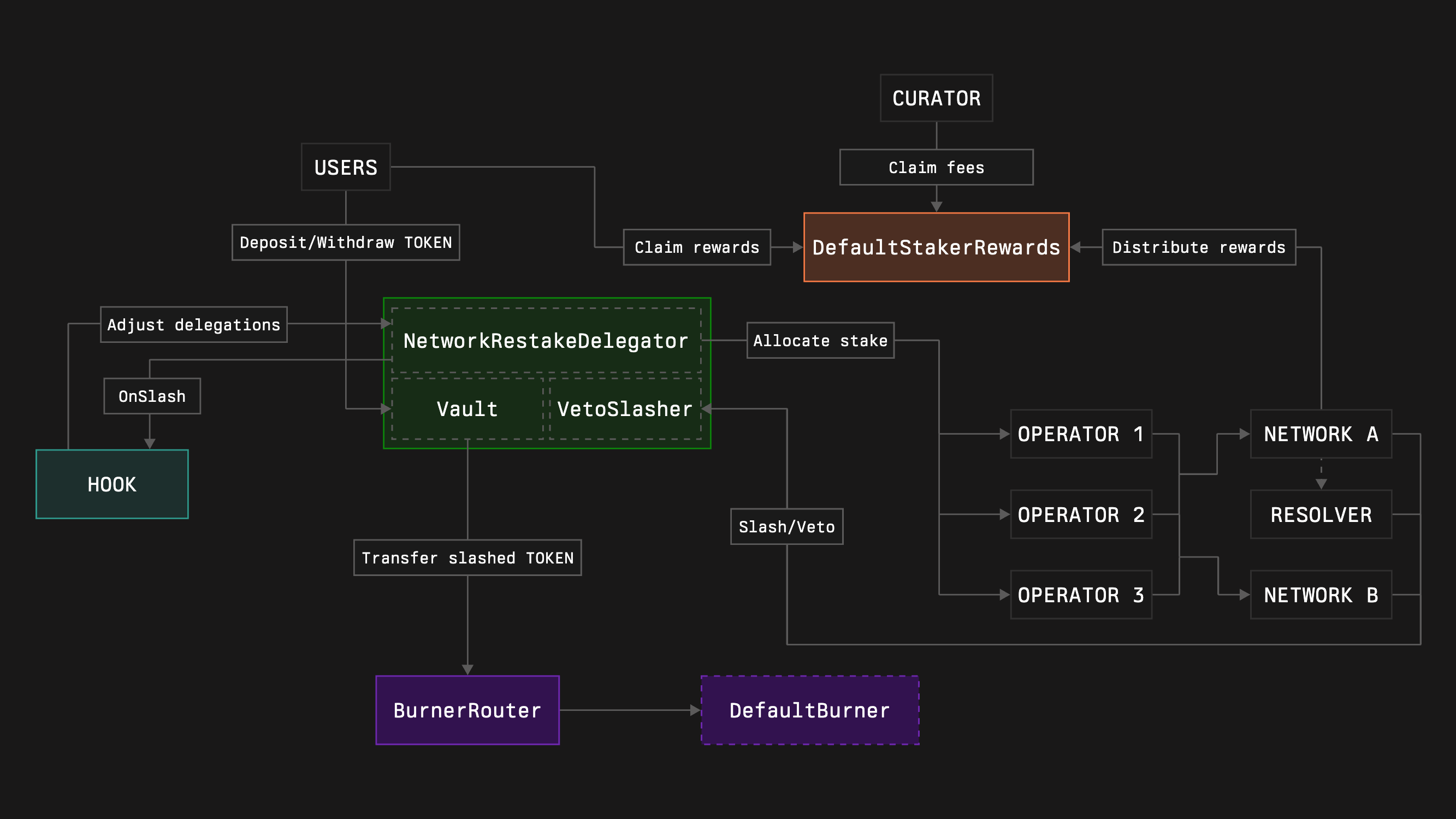
1. Clone the core contracts repository by running the following command:
```bash [bash]
git clone --recurse-submodules https://github.com/symbioticfi/core.git
```
2. Navigate into the cloned repository folder:
```bash [bash]
cd core
```
3. Deploy core modules contracts using a simple script:
Open [DeployVault.s.sol](https://github.com/symbioticfi/core/blob/main/script/DeployVault.s.sol) and configure these settings:
```bash [bash]
// Address of the owner of the vault who can migrate the vault to new versions whitelisted by Symbiotic
address OWNER = 0x0000000000000000000000000000000000000000;
// Address of the collateral token
address COLLATERAL = 0x0000000000000000000000000000000000000000;
// Vault's burner to send slashed funds to (e.g., 0xdEaD or some unwrapper contract; not used in case of no slasher)
address BURNER = 0x000000000000000000000000000000000000dEaD;
// Duration of the vault epoch (the withdrawal delay for staker varies from EPOCH_DURATION to 2 * EPOCH_DURATION depending on when the withdrawal is requested)
uint48 EPOCH_DURATION = 7 days;
// Type of the delegator:
// 0. NetworkRestakeDelegator (allows restaking across multiple networks and having multiple operators per network)
// 1. FullRestakeDelegator (do not use without knowing what you are doing)
// 2. OperatorSpecificDelegator (allows restaking across multiple networks with only a single operator)
// 3. OperatorNetworkSpecificDelegator (allocates the stake to a specific operator and network)
uint64 DELEGATOR_INDEX = 0;
// Setting depending on the delegator type:
// 0. NetworkLimitSetRoleHolders (adjust allocations for networks)
// 1. NetworkLimitSetRoleHolders (adjust allocations for networks)
// 2. NetworkLimitSetRoleHolders (adjust allocations for networks)
// 3. network (the only network that will receive the stake; should be an array with a single element)
address[] NETWORK_ALLOCATION_SETTERS_OR_NETWORK = [0x0000000000000000000000000000000000000000];
// Setting depending on the delegator type:
// 0. OperatorNetworkSharesSetRoleHolders (adjust allocations for operators inside networks; in shares, resulting percentage is operatorShares / totalOperatorShares)
// 1. OperatorNetworkLimitSetRoleHolders (adjust allocations for operators inside networks; in shares, resulting percentage is operatorShares / totalOperatorShares)
// 2. operator (the only operator that will receive the stake; should be an array with a single element)
// 3. operator (the only operator that will receive the stake; should be an array with a single element)
address[] OPERATOR_ALLOCATION_SETTERS_OR_OPERATOR = [0x0000000000000000000000000000000000000000];
// Whether to deploy a slasher
bool WITH_SLASHER = true;
// Type of the slasher:
// 0. Slasher (allows instant slashing)
// 1. VetoSlasher (allows having a veto period if the resolver is set)
uint64 SLASHER_INDEX = 1;
// Duration of a veto period (should be less than EPOCH_DURATION)
uint48 VETO_DURATION = 1 days;
// Optional
// Deposit limit (maximum amount of the active stake allowed in the vault)
uint256 DEPOSIT_LIMIT = 0;
// Addresses of the whitelisted depositors
address[] WHITELISTED_DEPOSITORS = new address[](0);
// Address of the hook contract which, e.g., can automatically adjust the allocations on slashing events (not used in case of no slasher)
address HOOK = ;
// Delay in epochs for a network to update a resolver
uint48 RESOLVER_SET_EPOCHS_DELAY = 3;
```
Edit the configuration fields, then run:
```bash [bash]
forge script script/DeployVault.s.sol:DeployVaultScript \
--rpc-url=https://ethereum-rpc.publicnode.com \
--chain mainnet \
--broadcast
```
```bash [bash]
forge script script/DeployVault.s.sol:DeployVaultScript \
--rpc-url=https://0xrpc.io/hoodi \
--chain hoodi \
--broadcast
```
```bash [bash]
forge script script/DeployVault.s.sol:DeployVaultScript \
--rpc-url=https://ethereum-sepolia-rpc.publicnode.com \
--chain sepolia \
--broadcast
```
:::note
This is an **example** command. Replace the given values with your own.
***
In addition, you need to [choose a preferred wallet option](https://book.getfoundry.sh/reference/forge/forge-script?highlight=forge%20script#wallet-options---raw) and adjust the command accordingly.
:::
The following instruction assumes you have an already initialized Foundry repository ([read more here](https://book.getfoundry.sh/getting-started/first-steps)).
1. Install the core contracts repository by running the following command:
```bash [bash]
forge install symbioticfi/core
```
2. Update (or create if not yet) a `remappings.txt` file inside your repository accordingly:
```txt title="remappings.txt"
...
@symbioticfi/core/=lib/core/
```
3. Create core modules with hook using [a VaultConfigurator contract](https://github.com/symbioticfi/core/blob/main/src/contracts/VaultConfigurator.sol):
:::note
This is an **example** code snippet. Replace the given values with your own.
:::
```solidity [DeployVaultWithHook.s.sol]
import {IVaultConfigurator} from "@symbioticfi/core/src/interfaces/IVaultConfigurator.sol";
import {IVault} from "@symbioticfi/core/src/interfaces/vault/IVault.sol";
import {IBaseDelegator} from "@symbioticfi/core/src/interfaces/delegator/IBaseDelegator.sol";
import {INetworkRestakeDelegator} from "@symbioticfi/core/src/interfaces/delegator/INetworkRestakeDelegator.sol";
import {IBaseSlasher} from "@symbioticfi/core/src/interfaces/slasher/IBaseSlasher.sol";
import {IVetoSlasher} from "@symbioticfi/core/src/interfaces/slasher/IVetoSlasher.sol";
// ...
address VAULT_CONFIGURATOR = 0x29300b1d3150B4E2b12fE80BE72f365E200441EC; // address of the VaultConfigurator (see Deployments page)
// ...
address hook = ;
address[] memory networkLimitSetRoleHolders = new address[](2);
networkLimitSetRoleHolders[0] = 0xe8616DEcea16b5216e805B0b8caf7784de7570E7;
networkLimitSetRoleHolders[1] = hook;
address[] memory operatorNetworkSharesSetRoleHolders = new address[](2);
operatorNetworkSharesSetRoleHolders[0] = 0xe8616DEcea16b5216e805B0b8caf7784de7570E7;
operatorNetworkSharesSetRoleHolders[1] = hook;
(address vault, address networkRestakeDelegator, address vetoSlasher) = IVaultConfigurator(VAULT_CONFIGURATOR).create(
IVaultConfigurator.InitParams({
version: 1, // Vault’s version (= common one)
owner: 0xe8616DEcea16b5216e805B0b8caf7784de7570E7, // address of the Vault’s owner (can migrate the Vault to new versions in the future)
vaultParams: abi.encode(IVault.InitParams({
collateral: 0x7f39C581F595B53c5cb19bD0b3f8dA6c935E2Ca0, // address of the collateral - wstETH
burner: , // address of the deployed burner router
epochDuration: 604800, // duration of the Vault epoch in seconds (= 7 days)
depositWhitelist: false, // if enable deposit whitelisting
isDepositLimit: false, // if enable deposit limit
depositLimit: 0, // deposit limit
defaultAdminRoleHolder: 0xe8616DEcea16b5216e805B0b8caf7784de7570E7, // address of the Vault’s admin (can manage all roles)
depositWhitelistSetRoleHolder: 0xe8616DEcea16b5216e805B0b8caf7784de7570E7, // address of the enabler/disabler of the deposit whitelisting
depositorWhitelistRoleHolder: 0xe8616DEcea16b5216e805B0b8caf7784de7570E7, // address of the depositors whitelister
isDepositLimitSetRoleHolder: 0xe8616DEcea16b5216e805B0b8caf7784de7570E7, // address of the enabler/disabler of the deposit limit
depositLimitSetRoleHolder: 0xe8616DEcea16b5216e805B0b8caf7784de7570E7 // address of the deposit limit setter
})),
delegatorIndex: 0, // Delegator’s type (= NetworkRestakeDelegator)
delegatorParams: abi.encode(INetworkRestakeDelegator.InitParams({
baseParams: IBaseDelegator.BaseParams({
defaultAdminRoleHolder: 0xe8616DEcea16b5216e805B0b8caf7784de7570E7, // address of the Delegator’s admin (can manage all roles)
hook: hook, // address of the hook (if not zero, receives onSlash() call on each slashing)
hookSetRoleHolder: 0xe8616DEcea16b5216e805B0b8caf7784de7570E7 // address of the hook setter
}),
networkLimitSetRoleHolders: networkLimitSetRoleHolders, // array of addresses of the network limit setters
operatorNetworkSharesSetRoleHolders: operatorNetworkSharesSetRoleHolders // array of addresses of the operator-network shares setters
})),
withSlasher: true, // if enable Slasher module
slasherIndex: 1, // Slasher’s type (= VetoSlasher)
slasherParams: abi.encode(IVetoSlasher.InitParams({
baseParams: IBaseSlasher.BaseParams({
isBurnerHook: true // if enable the `burner` to receive onSlash() call after each slashing (is needed for the burner router workflow)
}),
vetoDuration: 86400, // veto duration (= 1 day)
resolverSetEpochsDelay: 3 // number of Vault epochs needed for the resolver to be changed
}))
})
);
// ...
```
```solidity [DeployVaultWithHook.s.sol]
import {IVaultConfigurator} from "@symbioticfi/core/src/interfaces/IVaultConfigurator.sol";
import {IVault} from "@symbioticfi/core/src/interfaces/vault/IVault.sol";
import {IBaseDelegator} from "@symbioticfi/core/src/interfaces/delegator/IBaseDelegator.sol";
import {INetworkRestakeDelegator} from "@symbioticfi/core/src/interfaces/delegator/INetworkRestakeDelegator.sol";
import {IBaseSlasher} from "@symbioticfi/core/src/interfaces/slasher/IBaseSlasher.sol";
import {IVetoSlasher} from "@symbioticfi/core/src/interfaces/slasher/IVetoSlasher.sol";
// ...
address VAULT_CONFIGURATOR = 0x94c344E816A53D07fC4c7F4a18f82b6Da87CFc8f; // address of the VaultConfigurator (see Deployments page)
// ...
address hook = ;
address[] memory networkLimitSetRoleHolders = new address[](2);
networkLimitSetRoleHolders[0] = 0xe8616DEcea16b5216e805B0b8caf7784de7570E7;
networkLimitSetRoleHolders[1] = hook;
address[] memory operatorNetworkSharesSetRoleHolders = new address[](2);
operatorNetworkSharesSetRoleHolders[0] = 0xe8616DEcea16b5216e805B0b8caf7784de7570E7;
operatorNetworkSharesSetRoleHolders[1] = hook;
(address vault, address networkRestakeDelegator, address vetoSlasher) = IVaultConfigurator(VAULT_CONFIGURATOR).create(
IVaultConfigurator.InitParams({
version: 1, // Vault’s version (= common one)
owner: 0xe8616DEcea16b5216e805B0b8caf7784de7570E7, // address of the Vault’s owner (can migrate the Vault to new versions in the future)
vaultParams: abi.encode(IVault.InitParams({
collateral: 0x7f39C581F595B53c5cb19bD0b3f8dA6c935E2Ca0, // address of the collateral - wstETH
burner: , // address of the deployed burner router
epochDuration: 604800, // duration of the Vault epoch in seconds (= 7 days)
depositWhitelist: false, // if enable deposit whitelisting
isDepositLimit: false, // if enable deposit limit
depositLimit: 0, // deposit limit
defaultAdminRoleHolder: 0xe8616DEcea16b5216e805B0b8caf7784de7570E7, // address of the Vault’s admin (can manage all roles)
depositWhitelistSetRoleHolder: 0xe8616DEcea16b5216e805B0b8caf7784de7570E7, // address of the enabler/disabler of the deposit whitelisting
depositorWhitelistRoleHolder: 0xe8616DEcea16b5216e805B0b8caf7784de7570E7, // address of the depositors whitelister
isDepositLimitSetRoleHolder: 0xe8616DEcea16b5216e805B0b8caf7784de7570E7, // address of the enabler/disabler of the deposit limit
depositLimitSetRoleHolder: 0xe8616DEcea16b5216e805B0b8caf7784de7570E7 // address of the deposit limit setter
})),
delegatorIndex: 0, // Delegator’s type (= NetworkRestakeDelegator)
delegatorParams: abi.encode(INetworkRestakeDelegator.InitParams({
baseParams: IBaseDelegator.BaseParams({
defaultAdminRoleHolder: 0xe8616DEcea16b5216e805B0b8caf7784de7570E7, // address of the Delegator’s admin (can manage all roles)
hook: hook, // address of the hook (if not zero, receives onSlash() call on each slashing)
hookSetRoleHolder: 0xe8616DEcea16b5216e805B0b8caf7784de7570E7 // address of the hook setter
}),
networkLimitSetRoleHolders: networkLimitSetRoleHolders, // array of addresses of the network limit setters
operatorNetworkSharesSetRoleHolders: operatorNetworkSharesSetRoleHolders // array of addresses of the operator-network shares setters
})),
withSlasher: true, // if enable Slasher module
slasherIndex: 1, // Slasher’s type (= VetoSlasher)
slasherParams: abi.encode(IVetoSlasher.InitParams({
baseParams: IBaseSlasher.BaseParams({
isBurnerHook: true // if enable the `burner` to receive onSlash() call after each slashing (is needed for the burner router workflow)
}),
vetoDuration: 86400, // veto duration (= 1 day)
resolverSetEpochsDelay: 3 // number of Vault epochs needed for the resolver to be changed
}))
})
);
// ...
```
```solidity [DeployVaultWithHook.s.sol]
import {IVaultConfigurator} from "@symbioticfi/core/src/interfaces/IVaultConfigurator.sol";
import {IVault} from "@symbioticfi/core/src/interfaces/vault/IVault.sol";
import {IBaseDelegator} from "@symbioticfi/core/src/interfaces/delegator/IBaseDelegator.sol";
import {INetworkRestakeDelegator} from "@symbioticfi/core/src/interfaces/delegator/INetworkRestakeDelegator.sol";
import {IBaseSlasher} from "@symbioticfi/core/src/interfaces/slasher/IBaseSlasher.sol";
import {IVetoSlasher} from "@symbioticfi/core/src/interfaces/slasher/IVetoSlasher.sol";
// ...
address VAULT_CONFIGURATOR = 0xD2191FE92987171691d552C219b8caEf186eb9cA; // address of the VaultConfigurator (see Deployments page)
// ...
address hook = ;
address[] memory networkLimitSetRoleHolders = new address[](2);
networkLimitSetRoleHolders[0] = 0xe8616DEcea16b5216e805B0b8caf7784de7570E7;
networkLimitSetRoleHolders[1] = hook;
address[] memory operatorNetworkSharesSetRoleHolders = new address[](2);
operatorNetworkSharesSetRoleHolders[0] = 0xe8616DEcea16b5216e805B0b8caf7784de7570E7;
operatorNetworkSharesSetRoleHolders[1] = hook;
(address vault, address networkRestakeDelegator, address vetoSlasher) = IVaultConfigurator(VAULT_CONFIGURATOR).create(
IVaultConfigurator.InitParams({
version: 1, // Vault’s version (= common one)
owner: 0xe8616DEcea16b5216e805B0b8caf7784de7570E7, // address of the Vault’s owner (can migrate the Vault to new versions in the future)
vaultParams: abi.encode(IVault.InitParams({
collateral: 0x7f39C581F595B53c5cb19bD0b3f8dA6c935E2Ca0, // address of the collateral - wstETH
burner: , // address of the deployed burner router
epochDuration: 604800, // duration of the Vault epoch in seconds (= 7 days)
depositWhitelist: false, // if enable deposit whitelisting
isDepositLimit: false, // if enable deposit limit
depositLimit: 0, // deposit limit
defaultAdminRoleHolder: 0xe8616DEcea16b5216e805B0b8caf7784de7570E7, // address of the Vault’s admin (can manage all roles)
depositWhitelistSetRoleHolder: 0xe8616DEcea16b5216e805B0b8caf7784de7570E7, // address of the enabler/disabler of the deposit whitelisting
depositorWhitelistRoleHolder: 0xe8616DEcea16b5216e805B0b8caf7784de7570E7, // address of the depositors whitelister
isDepositLimitSetRoleHolder: 0xe8616DEcea16b5216e805B0b8caf7784de7570E7, // address of the enabler/disabler of the deposit limit
depositLimitSetRoleHolder: 0xe8616DEcea16b5216e805B0b8caf7784de7570E7 // address of the deposit limit setter
})),
delegatorIndex: 0, // Delegator’s type (= NetworkRestakeDelegator)
delegatorParams: abi.encode(INetworkRestakeDelegator.InitParams({
baseParams: IBaseDelegator.BaseParams({
defaultAdminRoleHolder: 0xe8616DEcea16b5216e805B0b8caf7784de7570E7, // address of the Delegator’s admin (can manage all roles)
hook: hook, // address of the hook (if not zero, receives onSlash() call on each slashing)
hookSetRoleHolder: 0xe8616DEcea16b5216e805B0b8caf7784de7570E7 // address of the hook setter
}),
networkLimitSetRoleHolders: networkLimitSetRoleHolders, // array of addresses of the network limit setters
operatorNetworkSharesSetRoleHolders: operatorNetworkSharesSetRoleHolders // array of addresses of the operator-network shares setters
})),
withSlasher: true, // if enable Slasher module
slasherIndex: 1, // Slasher’s type (= VetoSlasher)
slasherParams: abi.encode(IVetoSlasher.InitParams({
baseParams: IBaseSlasher.BaseParams({
isBurnerHook: true // if enable the `burner` to receive onSlash() call after each slashing (is needed for the burner router workflow)
}),
vetoDuration: 86400, // veto duration (= 1 day)
resolverSetEpochsDelay: 3 // number of Vault epochs needed for the resolver to be changed
}))
})
);
// ...
```
1. We need the address of the Vault’s Delegator contract. It can be obtained via `Vault.delegator()`
2. Make sure the caller has a `Delegator.HOOK_SET_ROLE()` role via [the OpenZeppelin’s `AccessControl` contract](https://docs.openzeppelin.com/contracts/5.x/access-control#using-access-control)
3. Call `Delegator.setHook(hook)`
### Deposit whitelist
Symbiotic Vaults contain a feature called - deposit whitelist. It allows the restriction of making deposits to the Vault only by the whitelisted depositors. Several parties may need such functionality, e.g.:
1. LRTs that want to fully isolate their Vaults from the external users to have a strict logic flow depending only on them
2. Institutional entities that want to reduce the risks maximally and respect the legal side
3. Some third-party entities that want to integrate the Vaults with some specific logic on top of them
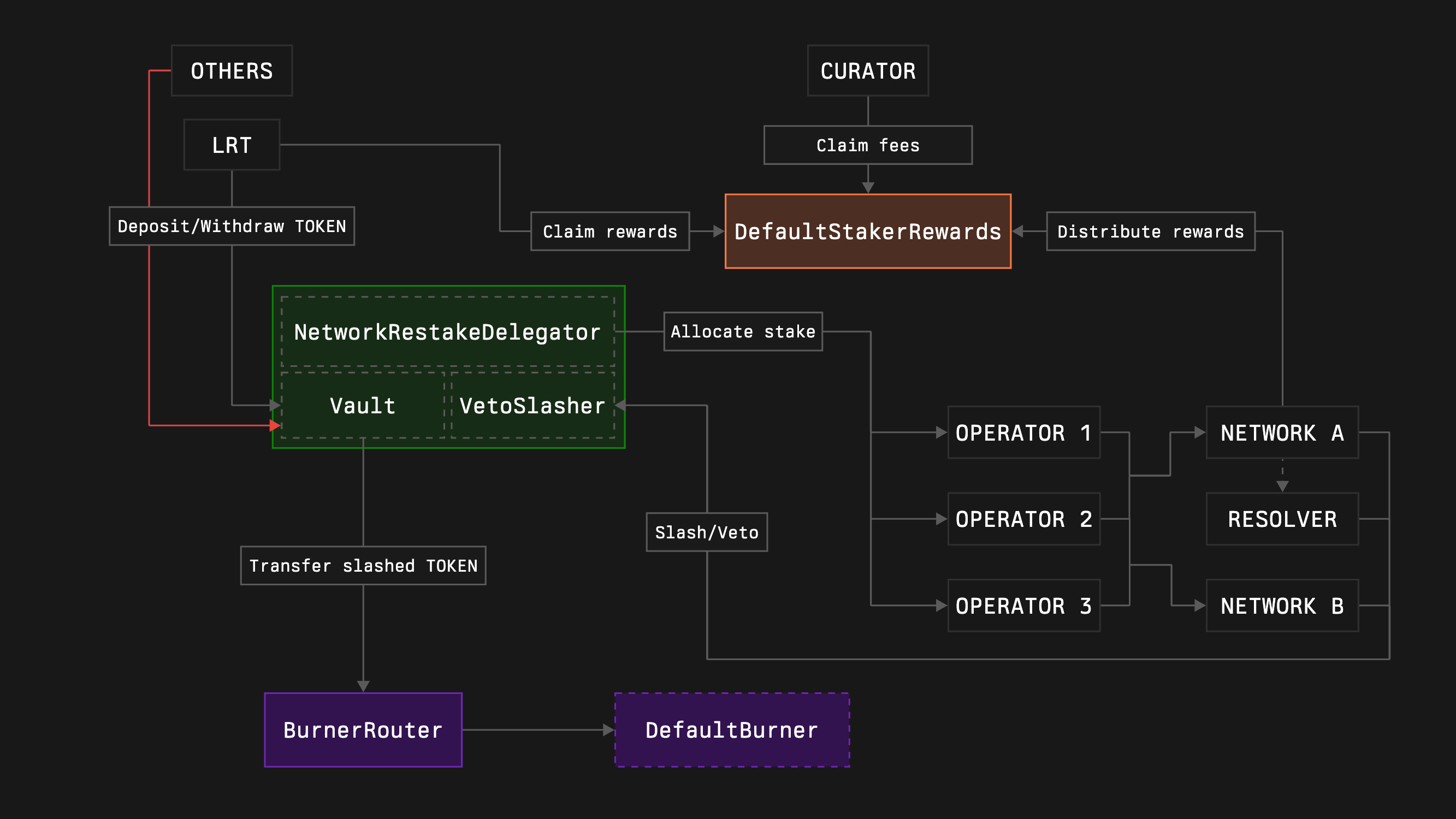
1. Clone the core contracts repository by running the following command:
```bash [bash]
git clone --recurse-submodules https://github.com/symbioticfi/core.git
```
2. Navigate into the cloned repository folder:
```bash [bash]
cd core
```
3. Deploy core modules contracts using a simple script:
Open [DeployVault.s.sol](https://github.com/symbioticfi/core/blob/main/script/DeployVault.s.sol) and configure these settings:
```bash [bash]
// Address of the owner of the vault who can migrate the vault to new versions whitelisted by Symbiotic
address OWNER = 0x0000000000000000000000000000000000000000;
// Address of the collateral token
address COLLATERAL = 0x0000000000000000000000000000000000000000;
// Vault's burner to send slashed funds to (e.g., 0xdEaD or some unwrapper contract; not used in case of no slasher)
address BURNER = 0x000000000000000000000000000000000000dEaD;
// Duration of the vault epoch (the withdrawal delay for staker varies from EPOCH_DURATION to 2 * EPOCH_DURATION depending on when the withdrawal is requested)
uint48 EPOCH_DURATION = 7 days;
// Type of the delegator:
// 0. NetworkRestakeDelegator (allows restaking across multiple networks and having multiple operators per network)
// 1. FullRestakeDelegator (do not use without knowing what you are doing)
// 2. OperatorSpecificDelegator (allows restaking across multiple networks with only a single operator)
// 3. OperatorNetworkSpecificDelegator (allocates the stake to a specific operator and network)
uint64 DELEGATOR_INDEX = 0;
// Setting depending on the delegator type:
// 0. NetworkLimitSetRoleHolders (adjust allocations for networks)
// 1. NetworkLimitSetRoleHolders (adjust allocations for networks)
// 2. NetworkLimitSetRoleHolders (adjust allocations for networks)
// 3. network (the only network that will receive the stake; should be an array with a single element)
address[] NETWORK_ALLOCATION_SETTERS_OR_NETWORK = [0x0000000000000000000000000000000000000000];
// Setting depending on the delegator type:
// 0. OperatorNetworkSharesSetRoleHolders (adjust allocations for operators inside networks; in shares, resulting percentage is operatorShares / totalOperatorShares)
// 1. OperatorNetworkLimitSetRoleHolders (adjust allocations for operators inside networks; in shares, resulting percentage is operatorShares / totalOperatorShares)
// 2. operator (the only operator that will receive the stake; should be an array with a single element)
// 3. operator (the only operator that will receive the stake; should be an array with a single element)
address[] OPERATOR_ALLOCATION_SETTERS_OR_OPERATOR = [0x0000000000000000000000000000000000000000];
// Whether to deploy a slasher
bool WITH_SLASHER = true;
// Type of the slasher:
// 0. Slasher (allows instant slashing)
// 1. VetoSlasher (allows having a veto period if the resolver is set)
uint64 SLASHER_INDEX = 1;
// Duration of a veto period (should be less than EPOCH_DURATION)
uint48 VETO_DURATION = 1 days;
// Optional
// Deposit limit (maximum amount of the active stake allowed in the vault)
uint256 DEPOSIT_LIMIT = 0;
// Addresses of the whitelisted depositors
address[] WHITELISTED_DEPOSITORS = ;
// Address of the hook contract which, e.g., can automatically adjust the allocations on slashing events (not used in case of no slasher)
address HOOK = 0x0000000000000000000000000000000000000000;
// Delay in epochs for a network to update a resolver
uint48 RESOLVER_SET_EPOCHS_DELAY = 3;
```
Edit the configuration fields, then run:
```bash [bash]
forge script script/DeployVault.s.sol:DeployVaultScript \
--rpc-url=https://ethereum-rpc.publicnode.com \
--chain mainnet \
--broadcast
```
```bash [bash]
forge script script/DeployVault.s.sol:DeployVaultScript \
--rpc-url=https://0xrpc.io/hoodi \
--chain hoodi \
--broadcast
```
```bash [bash]
forge script script/DeployVault.s.sol:DeployVaultScript \
--rpc-url=https://ethereum-sepolia-rpc.publicnode.com \
--chain sepolia \
--broadcast
```
:::note
This is an **example** command. Replace the given values with your own.
***
In addition, you need to [choose a preferred wallet option](https://book.getfoundry.sh/reference/forge/forge-script?highlight=forge%20script#wallet-options---raw) and adjust the command accordingly.
:::
The following instruction assumes you have an already initialized Foundry repository ([read more here](https://book.getfoundry.sh/getting-started/first-steps)).
1. Install the core contracts repository by running the following command:
```bash [bash]
forge install symbioticfi/core
```
2. Update (or create if not yet) a `remappings.txt` file inside your repository accordingly:
```txt title="remappings.txt"
...
@symbioticfi/core/=lib/core/
```
3. Create core modules with deposit whitelist using [a VaultConfigurator contract](https://github.com/symbioticfi/core/blob/main/src/contracts/VaultConfigurator.sol):
:::note
This is an **example** code snippet. Replace the given values with your own.
:::
```solidity [DeployVaultWithWhitelist.s.sol]
import {Vault} from "@symbioticfi/core/src/contracts/vault/Vault.sol";
import {IVaultConfigurator} from "@symbioticfi/core/src/interfaces/IVaultConfigurator.sol";
import {IVault} from "@symbioticfi/core/src/interfaces/vault/IVault.sol";
import {IBaseDelegator} from "@symbioticfi/core/src/interfaces/delegator/IBaseDelegator.sol";
import {INetworkRestakeDelegator} from "@symbioticfi/core/src/interfaces/delegator/INetworkRestakeDelegator.sol";
import {IBaseSlasher} from "@symbioticfi/core/src/interfaces/slasher/IBaseSlasher.sol";
import {IVetoSlasher} from "@symbioticfi/core/src/interfaces/slasher/IVetoSlasher.sol";
// ...
address VAULT_CONFIGURATOR = 0x29300b1d3150B4E2b12fE80BE72f365E200441EC; // address of the VaultConfigurator (see Deployments page)
// ...
address[] memory networkLimitSetRoleHolders = new address[](1);
networkLimitSetRoleHolders[0] = 0xe8616DEcea16b5216e805B0b8caf7784de7570E7;
address[] memory operatorNetworkSharesSetRoleHolders = new address[](1);
operatorNetworkSharesSetRoleHolders[0] = 0xe8616DEcea16b5216e805B0b8caf7784de7570E7;
(address vault, address networkRestakeDelegator, address vetoSlasher) = IVaultConfigurator(VAULT_CONFIGURATOR).create(
IVaultConfigurator.InitParams({
version: 1, // Vault’s version (= common one)
owner: 0xe8616DEcea16b5216e805B0b8caf7784de7570E7, // address of the Vault’s owner (can migrate the Vault to new versions in the future)
vaultParams: abi.encode(IVault.InitParams({
collateral: 0x7f39C581F595B53c5cb19bD0b3f8dA6c935E2Ca0, // address of the collateral - wstETH
burner: , // address of the deployed burner router
epochDuration: 604800, // duration of the Vault epoch in seconds (= 7 days)
depositWhitelist: true, // if enable deposit whitelisting
isDepositLimit: false, // if enable deposit limit
depositLimit: 0, // deposit limit
defaultAdminRoleHolder: address(this), // address of the Vault’s admin (can manage all roles)
depositWhitelistSetRoleHolder: 0xe8616DEcea16b5216e805B0b8caf7784de7570E7, // address of the enabler/disabler of the deposit whitelisting
depositorWhitelistRoleHolder: 0xe8616DEcea16b5216e805B0b8caf7784de7570E7, // address of the depositors whitelister
isDepositLimitSetRoleHolder: 0xe8616DEcea16b5216e805B0b8caf7784de7570E7, // address of the enabler/disabler of the deposit limit
depositLimitSetRoleHolder: 0xe8616DEcea16b5216e805B0b8caf7784de7570E7 // address of the deposit limit setter
})),
delegatorIndex: 0, // Delegator’s type (= NetworkRestakeDelegator)
delegatorParams: abi.encode(INetworkRestakeDelegator.InitParams({
baseParams: IBaseDelegator.BaseParams({
defaultAdminRoleHolder: 0xe8616DEcea16b5216e805B0b8caf7784de7570E7, // address of the Delegator’s admin (can manage all roles)
hook: 0x0000000000000000000000000000000000000000, // address of the hook (if not zero, receives onSlash() call on each slashing)
hookSetRoleHolder: 0xe8616DEcea16b5216e805B0b8caf7784de7570E7 // address of the hook setter
}),
networkLimitSetRoleHolders: networkLimitSetRoleHolders, // array of addresses of the network limit setters
operatorNetworkSharesSetRoleHolders: operatorNetworkSharesSetRoleHolders // array of addresses of the operator-network shares setters
})),
withSlasher: true, // if enable Slasher module
slasherIndex: 1, // Slasher’s type (= VetoSlasher)
slasherParams: abi.encode(IVetoSlasher.InitParams({
baseParams: IBaseSlasher.BaseParams({
isBurnerHook: true // if enable the `burner` to receive onSlash() call after each slashing (is needed for the burner router workflow)
}),
vetoDuration: 86400, // veto duration (= 1 day)
resolverSetEpochsDelay: 3 // number of Vault epochs needed for the resolver to be changed
}))
})
);
Vault(vault).grantRole(Vault(vault).DEFAULT_ADMIN_ROLE(), 0xe8616DEcea16b5216e805B0b8caf7784de7570E7);
Vault(vault).grantRole(Vault(vault).DEPOSITOR_WHITELIST_ROLE(), address(this));
IVault(vault).setDepositorWhitelistStatus(, true);
Vault(vault).renounceRole(Vault(vault).DEPOSITOR_WHITELIST_ROLE(), address(this));
Vault(vault).renounceRole(Vault(vault).DEFAULT_ADMIN_ROLE(), address(this));
// ...
```
```solidity [DeployVaultWithWhitelist.s.sol]
import {Vault} from "@symbioticfi/core/src/contracts/vault/Vault.sol";
import {IVaultConfigurator} from "@symbioticfi/core/src/interfaces/IVaultConfigurator.sol";
import {IVault} from "@symbioticfi/core/src/interfaces/vault/IVault.sol";
import {IBaseDelegator} from "@symbioticfi/core/src/interfaces/delegator/IBaseDelegator.sol";
import {INetworkRestakeDelegator} from "@symbioticfi/core/src/interfaces/delegator/INetworkRestakeDelegator.sol";
import {IBaseSlasher} from "@symbioticfi/core/src/interfaces/slasher/IBaseSlasher.sol";
import {IVetoSlasher} from "@symbioticfi/core/src/interfaces/slasher/IVetoSlasher.sol";
// ...
address VAULT_CONFIGURATOR = 0x94c344E816A53D07fC4c7F4a18f82b6Da87CFc8f; // address of the VaultConfigurator (see Deployments page)
// ...
address[] memory networkLimitSetRoleHolders = new address[](1);
networkLimitSetRoleHolders[0] = 0xe8616DEcea16b5216e805B0b8caf7784de7570E7;
address[] memory operatorNetworkSharesSetRoleHolders = new address[](1);
operatorNetworkSharesSetRoleHolders[0] = 0xe8616DEcea16b5216e805B0b8caf7784de7570E7;
(address vault, address networkRestakeDelegator, address vetoSlasher) = IVaultConfigurator(VAULT_CONFIGURATOR).create(
IVaultConfigurator.InitParams({
version: 1, // Vault’s version (= common one)
owner: 0xe8616DEcea16b5216e805B0b8caf7784de7570E7, // address of the Vault’s owner (can migrate the Vault to new versions in the future)
vaultParams: abi.encode(IVault.InitParams({
collateral: 0x8d09a4502Cc8Cf1547aD300E066060D043f6982D, // address of the collateral - wstETH
burner: , // address of the deployed burner router
epochDuration: 604800, // duration of the Vault epoch in seconds (= 7 days)
depositWhitelist: true, // if enable deposit whitelisting
isDepositLimit: false, // if enable deposit limit
depositLimit: 0, // deposit limit
defaultAdminRoleHolder: address(this), // address of the Vault’s admin (can manage all roles)
depositWhitelistSetRoleHolder: 0xe8616DEcea16b5216e805B0b8caf7784de7570E7, // address of the enabler/disabler of the deposit whitelisting
depositorWhitelistRoleHolder: 0xe8616DEcea16b5216e805B0b8caf7784de7570E7, // address of the depositors whitelister
isDepositLimitSetRoleHolder: 0xe8616DEcea16b5216e805B0b8caf7784de7570E7, // address of the enabler/disabler of the deposit limit
depositLimitSetRoleHolder: 0xe8616DEcea16b5216e805B0b8caf7784de7570E7 // address of the deposit limit setter
})),
delegatorIndex: 0, // Delegator’s type (= NetworkRestakeDelegator)
delegatorParams: abi.encode(INetworkRestakeDelegator.InitParams({
baseParams: IBaseDelegator.BaseParams({
defaultAdminRoleHolder: 0xe8616DEcea16b5216e805B0b8caf7784de7570E7, // address of the Delegator’s admin (can manage all roles)
hook: 0x0000000000000000000000000000000000000000, // address of the hook (if not zero, receives onSlash() call on each slashing)
hookSetRoleHolder: 0xe8616DEcea16b5216e805B0b8caf7784de7570E7 // address of the hook setter
}),
networkLimitSetRoleHolders: networkLimitSetRoleHolders, // array of addresses of the network limit setters
operatorNetworkSharesSetRoleHolders: operatorNetworkSharesSetRoleHolders // array of addresses of the operator-network shares setters
})),
withSlasher: true, // if enable Slasher module
slasherIndex: 1, // Slasher’s type (= VetoSlasher)
slasherParams: abi.encode(IVetoSlasher.InitParams({
baseParams: IBaseSlasher.BaseParams({
isBurnerHook: true // if enable the `burner` to receive onSlash() call after each slashing (is needed for the burner router workflow)
}),
vetoDuration: 86400, // veto duration (= 1 day)
resolverSetEpochsDelay: 3 // number of Vault epochs needed for the resolver to be changed
}))
})
);
Vault(vault).grantRole(Vault(vault).DEFAULT_ADMIN_ROLE(), 0xe8616DEcea16b5216e805B0b8caf7784de7570E7);
Vault(vault).grantRole(Vault(vault).DEPOSITOR_WHITELIST_ROLE(), address(this));
IVault(vault).setDepositorWhitelistStatus(, true);
Vault(vault).renounceRole(Vault(vault).DEPOSITOR_WHITELIST_ROLE(), address(this));
Vault(vault).renounceRole(Vault(vault).DEFAULT_ADMIN_ROLE(), address(this));
// ...
```
```solidity [DeployVaultWithWhitelist.s.sol]
import {Vault} from "@symbioticfi/core/src/contracts/vault/Vault.sol";
import {IVaultConfigurator} from "@symbioticfi/core/src/interfaces/IVaultConfigurator.sol";
import {IVault} from "@symbioticfi/core/src/interfaces/vault/IVault.sol";
import {IBaseDelegator} from "@symbioticfi/core/src/interfaces/delegator/IBaseDelegator.sol";
import {INetworkRestakeDelegator} from "@symbioticfi/core/src/interfaces/delegator/INetworkRestakeDelegator.sol";
import {IBaseSlasher} from "@symbioticfi/core/src/interfaces/slasher/IBaseSlasher.sol";
import {IVetoSlasher} from "@symbioticfi/core/src/interfaces/slasher/IVetoSlasher.sol";
// ...
address VAULT_CONFIGURATOR = 0xD2191FE92987171691d552C219b8caEf186eb9cA; // address of the VaultConfigurator (see Deployments page)
// ...
address[] memory networkLimitSetRoleHolders = new address[](1);
networkLimitSetRoleHolders[0] = 0xe8616DEcea16b5216e805B0b8caf7784de7570E7;
address[] memory operatorNetworkSharesSetRoleHolders = new address[](1);
operatorNetworkSharesSetRoleHolders[0] = 0xe8616DEcea16b5216e805B0b8caf7784de7570E7;
(address vault, address networkRestakeDelegator, address vetoSlasher) = IVaultConfigurator(VAULT_CONFIGURATOR).create(
IVaultConfigurator.InitParams({
version: 1, // Vault’s version (= common one)
owner: 0xe8616DEcea16b5216e805B0b8caf7784de7570E7, // address of the Vault’s owner (can migrate the Vault to new versions in the future)
vaultParams: abi.encode(IVault.InitParams({
collateral: 0xB82381A3fBD3FaFA77B3a7bE693342618240067b, // address of the collateral - wstETH
burner: , // address of the deployed burner router
epochDuration: 604800, // duration of the Vault epoch in seconds (= 7 days)
depositWhitelist: true, // if enable deposit whitelisting
isDepositLimit: false, // if enable deposit limit
depositLimit: 0, // deposit limit
defaultAdminRoleHolder: address(this), // address of the Vault’s admin (can manage all roles)
depositWhitelistSetRoleHolder: 0xe8616DEcea16b5216e805B0b8caf7784de7570E7, // address of the enabler/disabler of the deposit whitelisting
depositorWhitelistRoleHolder: 0xe8616DEcea16b5216e805B0b8caf7784de7570E7, // address of the depositors whitelister
isDepositLimitSetRoleHolder: 0xe8616DEcea16b5216e805B0b8caf7784de7570E7, // address of the enabler/disabler of the deposit limit
depositLimitSetRoleHolder: 0xe8616DEcea16b5216e805B0b8caf7784de7570E7 // address of the deposit limit setter
})),
delegatorIndex: 0, // Delegator’s type (= NetworkRestakeDelegator)
delegatorParams: abi.encode(INetworkRestakeDelegator.InitParams({
baseParams: IBaseDelegator.BaseParams({
defaultAdminRoleHolder: 0xe8616DEcea16b5216e805B0b8caf7784de7570E7, // address of the Delegator’s admin (can manage all roles)
hook: 0x0000000000000000000000000000000000000000, // address of the hook (if not zero, receives onSlash() call on each slashing)
hookSetRoleHolder: 0xe8616DEcea16b5216e805B0b8caf7784de7570E7 // address of the hook setter
}),
networkLimitSetRoleHolders: networkLimitSetRoleHolders, // array of addresses of the network limit setters
operatorNetworkSharesSetRoleHolders: operatorNetworkSharesSetRoleHolders // array of addresses of the operator-network shares setters
})),
withSlasher: true, // if enable Slasher module
slasherIndex: 1, // Slasher’s type (= VetoSlasher)
slasherParams: abi.encode(IVetoSlasher.InitParams({
baseParams: IBaseSlasher.BaseParams({
isBurnerHook: true // if enable the `burner` to receive onSlash() call after each slashing (is needed for the burner router workflow)
}),
vetoDuration: 86400, // veto duration (= 1 day)
resolverSetEpochsDelay: 3 // number of Vault epochs needed for the resolver to be changed
}))
})
);
Vault(vault).grantRole(Vault(vault).DEFAULT_ADMIN_ROLE(), 0xe8616DEcea16b5216e805B0b8caf7784de7570E7);
Vault(vault).grantRole(Vault(vault).DEPOSITOR_WHITELIST_ROLE(), address(this));
IVault(vault).setDepositorWhitelistStatus(, true);
Vault(vault).renounceRole(Vault(vault).DEPOSITOR_WHITELIST_ROLE(), address(this));
Vault(vault).renounceRole(Vault(vault).DEFAULT_ADMIN_ROLE(), address(this));
// ...
```
1. Make sure the caller has a `Vault.DEPOSIT_WHITELIST_SET_ROLE()` role via [the OpenZeppelin’s `AccessControl` contract](https://docs.openzeppelin.com/contracts/5.x/access-control#using-access-control)
2. Call `Vault.setDepositWhitelist(true)`
3. Make sure the caller has a `Vault.DEPOSITOR_WHITELIST_ROLE()` role via [the OpenZeppelin’s `AccessControl` contract](https://docs.openzeppelin.com/contracts/5.x/access-control#using-access-control)
4. Call `Vault.setDepositorWhitelistStatus(account, true)`
---
## /integrate/curators/helpful-core-contracts-endpoints
---
description: "This page lists useful functions for curators across Symbiotic Core contracts."
---
# Helpful Core Contracts' Endpoints
This page lists useful functions for curators across Symbiotic Core contracts.
| Function | Use-case |
| --------------------------------------------------------------------------------------------------------------------------------------------------------------------------------------------------------------------------------------------------------- | -------------------------------------------------------------------- |
| [`create(InitParams params) -> address, address, address`](https://github.com/symbioticfi/core/blob/7cb06639c5cd656d1d212dafa2c270b5fde39306/src/interfaces/IVaultConfigurator.sol#L52) | Create a new Vault |
| [`Vault.delegator() → address`](https://github.com/symbioticfi/core/blob/7cb06639c5cd656d1d212dafa2c270b5fde39306/src/interfaces/vault/IVaultStorage.sol#L60) | Get the Vault's delegator |
| [`Vault.slasher() → address`](https://github.com/symbioticfi/core/blob/7cb06639c5cd656d1d212dafa2c270b5fde39306/src/interfaces/vault/IVaultStorage.sol#L72) | Get the Vault's slasher |
| [`BaseDelegator.TYPE() → uint64`](https://github.com/symbioticfi/core/blob/7cb06639c5cd656d1d212dafa2c270b5fde39306/src/interfaces/common/IEntity.sol#L17) | Get the delegator's type (0 - NetworkRestake, 1 - FullRestake, etc.) |
| [`BaseDelegator.stake(bytes32 subnetwork, address operator) → uint256`](https://github.com/symbioticfi/core/blob/7cb06639c5cd656d1d212dafa2c270b5fde39306/src/interfaces/delegator/IBaseDelegator.sol#L150) | Get the operator-network's stake |
| [`NetworkRestakeDelegator.setNetworkLimit(bytes32 subnetwork, uint256 amount)`](https://github.com/symbioticfi/core/blob/7cb06639c5cd656d1d212dafa2c270b5fde39306/src/interfaces/delegator/INetworkRestakeDelegator.sol#L136) | Set a amount of collateral to allocate to the network |
| [`NetworkRestakeDelegator.networkLimit(bytes32 subnetwork) -> uint256`](https://github.com/symbioticfi/core/blob/7cb06639c5cd656d1d212dafa2c270b5fde39306/src/interfaces/delegator/INetworkRestakeDelegator.sol#L84) | Check the network's allocation |
| [`NetworkRestakeDelegator.setOperatorNetworkShares(bytes32 subnetwork, address operator, uint256 shares) `](https://github.com/symbioticfi/core/blob/7cb06639c5cd656d1d212dafa2c270b5fde39306/src/interfaces/delegator/INetworkRestakeDelegator.sol#L147) | Set the operator's share from the network's allocation |
| [`NetworkRestakeDelegator.operatorNetworkShares(bytes32 subnetwork, address operator) -> uint256`](https://github.com/symbioticfi/core/blob/7cb06639c5cd656d1d212dafa2c270b5fde39306/src/interfaces/delegator/INetworkRestakeDelegator.sol#L128) | Check the operator-network's shares |
| [`FullRestakeDelegator.setNetworkLimit(bytes32 subnetwork, uint256 amount)`](https://github.com/symbioticfi/core/blob/7cb06639c5cd656d1d212dafa2c270b5fde39306/src/interfaces/delegator/IFullRestakeDelegator.sol#L112) | Set a amount of collateral to allocate to the network |
| [`FullRestakeDelegator.networkLimit(bytes32 subnetwork) -> uint256`](https://github.com/symbioticfi/core/blob/7cb06639c5cd656d1d212dafa2c270b5fde39306/src/interfaces/delegator/IFullRestakeDelegator.sol#L81) | Check the network's allocation |
| [`NetworkRestakeDelegator.setOperatorNetworkLimit(bytes32 subnetwork, address operator, uint256 amount)`](https://github.com/symbioticfi/core/blob/7cb06639c5cd656d1d212dafa2c270b5fde39306/src/interfaces/delegator/IFullRestakeDelegator.sol#L122) | Set the operator's limit over the network's allocation |
| [`NetworkRestakeDelegator.operatorNetworkLimit(bytes32 subnetwork, address operator) -> uint256`](https://github.com/symbioticfi/core/blob/7cb06639c5cd656d1d212dafa2c270b5fde39306/src/interfaces/delegator/IFullRestakeDelegator.sol#L104) | Check the operator-network's limit |
| [`OperatorSpecificDelegator.setNetworkLimit(bytes32 subnetwork, uint256 amount)`](https://github.com/symbioticfi/core/blob/7cb06639c5cd656d1d212dafa2c270b5fde39306/src/interfaces/delegator/IOperatorSpecificDelegator.sol#L85) | Set a amount of collateral to allocate to the network |
| [`OperatorSpecificDelegator.networkLimit(bytes32 subnetwork) -> uint256`](https://github.com/symbioticfi/core/blob/7cb06639c5cd656d1d212dafa2c270b5fde39306/src/interfaces/delegator/IOperatorSpecificDelegator.sol#L77) | Check the network's allocation |
| [`OperatorSpecificDelegator.operator() -> address`](https://github.com/symbioticfi/core/blob/7cb06639c5cd656d1d212dafa2c270b5fde39306/src/interfaces/delegator/IOperatorSpecificDelegator.sol#L60) | Check the operator who receive all the allocations |
| [`OperatorSpecificDelegator.network() -> address`](https://github.com/symbioticfi/core/blob/7cb06639c5cd656d1d212dafa2c270b5fde39306/src/interfaces/delegator/IOperatorNetworkSpecificDelegator.sol#L44) | Check the network who receive all the allocations |
| [`OperatorSpecificDelegator.operator() -> address`](https://github.com/symbioticfi/core/blob/7cb06639c5cd656d1d212dafa2c270b5fde39306/src/interfaces/delegator/IOperatorNetworkSpecificDelegator.sol#L50) | Check the operator who receive all the allocations |
| [`BaseSlasher.TYPE() → uint64`](https://github.com/symbioticfi/core/blob/7cb06639c5cd656d1d212dafa2c270b5fde39306/src/interfaces/common/IEntity.sol#L17) | Get the slasher's type (0 - Slasher, 1 - VetoSlasher) |
---
## /integrate/curators
---
description: "This guide walks you through the curator lifecycle in Symbiotic. You'll deploy a vault, manage allocations, and earn fees from managing depositors' funds."
---
import { Card1 } from "../../../components/Card1";
# Get Started
This guide walks you through the curator lifecycle in Symbiotic. You'll deploy a vault, manage allocations, and earn fees from managing depositors' funds.
:::steps
## Deploy Vault
Deploy a vault that matches your curation needs.
}
href="/integrate/curators/deploy-vault"
/>
## Configure Curator & Operator Fees
Register the curator in `CuratorRegistry` and configure curator and operator fees.
}
href="/integrate/curators/registry-and-fees"
/>
## Submit Metadata
Make your curator and vault visible on the Symbiotic UI.
}
href="/integrate/curators/submit-metadata"
/>
## Manage Allocations
Configure how your vault allocates stake to networks and operators.
:::
---
## /integrate/curators/manage-allocations
---
description: "Learn how curators manage network and operator allocations for Symbiotic vaults."
---
# Manage Allocations
As a curator, you perform two actions:
- Set network allocation — determine how much funds to delegate to each network
- Set operator shares within each network — specify how the network's allocation is distributed among operators
## Set Initial Network Delegation
### Using [Safe](https://app.safe.global/)
1. Open "Transaction builder"
2. Get the delegator contract address of your vault (using UI, CLI, or Etherscan)
3. Enter the delegator's address as the contract address
4. Click "Use Implementation ABI"
5. Choose the `setNetworkLimit()` method
6. Enter the desired subnetwork (network address concatenated with the uint96 identifier)
7. Enter the maximum amount of collateral to allocate to the subnetwork
8. Sign and send the transaction
### Verify via Etherscan
1. Open the "Read Contract" tab in the delegator contract you used
2. Open the `networkLimit()` method
3. Enter `SUBNETWORK` (network address concatenated with the uint96 identifier) in the `subnetwork` parameter
4. Click "Query" — it should return the set amount
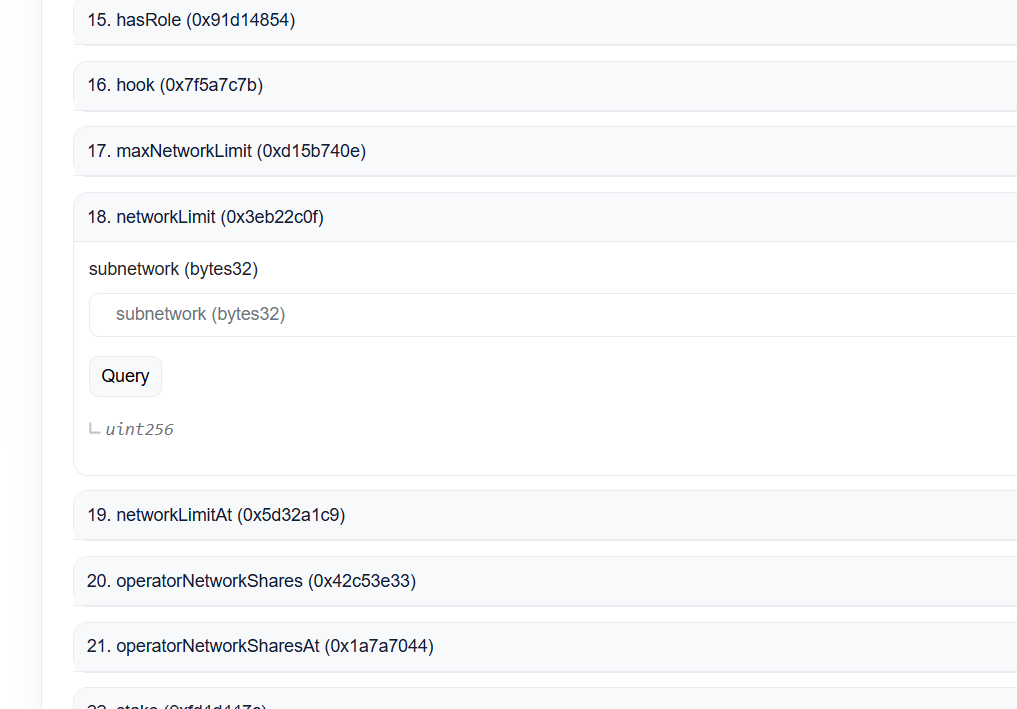
## Set Initial Operator Delegation
### Using [Safe](https://app.safe.global/)
1. Open "Transaction builder"
2. Get the delegator contract address of your vault (using UI, CLI, or Etherscan)
3. Enter the delegator's address as the contract address
4. Click "Use Implementation ABI"
5. Choose the `setOperatorNetworkShares()` method
6. Enter the desired subnetwork (network address concatenated with the uint96 identifier)
7. Enter the operator address
8. Enter the amount of shares to allocate to the operator (e.g., 100 shares out of 1000 total shares means 10% of the stake allocated to the subnetwork)
9. Sign and send the transaction
### Verify via Etherscan
1. Open the "Read Contract" tab in the delegator you used
2. Open the `operatorNetworkShares()` method (you may also need `totalOperatorNetworkShares`)
3. Enter `SUBNETWORK` (network address concatenated with the uint96 identifier) in the `subnetwork` parameter and `OPERATOR_ADDRESS` in the `operator` parameter
4. Click "Query" — it should return the set amount
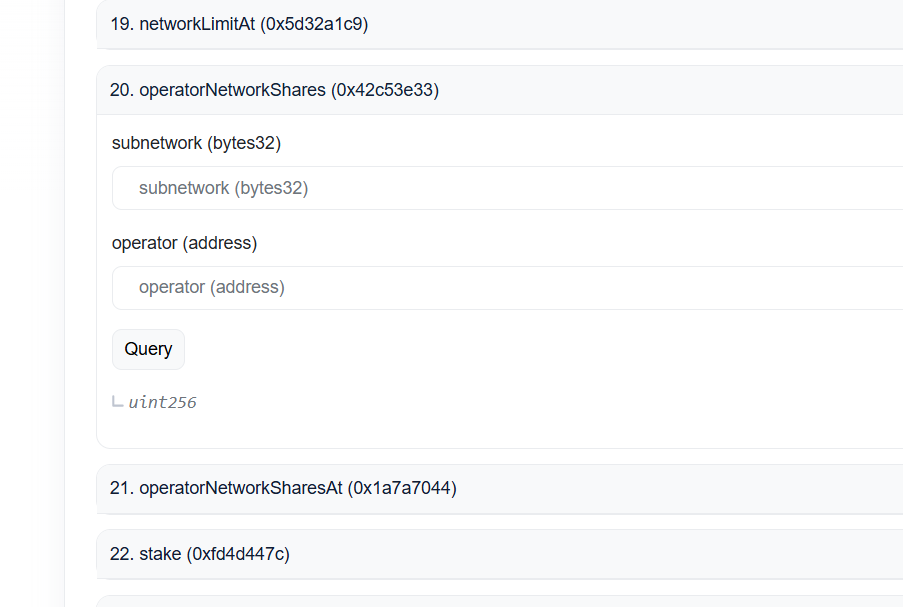
---
## /integrate/curators/registry-and-fees
---
description: "The vault.owner() sets the curator in CuratorRegistry. This links a vault to the curator address that will manage fee settings and claim curator fees."
---
# Manage & Claim Fees
## Register the curator
The `vault.owner()` sets the curator in `CuratorRegistry`. This links a vault to the curator address that will manage fee settings and claim curator fees.
Find the up-to-date `CuratorRegistry` address on the [Addresses page](/get-started/resources/addresses#rewards).
### Register curator example
Curators are set via `setCurator` on `CuratorRegistry` ([Contract](https://github.com/symbioticfi/rewards-v2/blob/main/src/contracts/CuratorRegistry.sol) | [Interface](https://github.com/symbioticfi/rewards-v2/blob/main/src/interfaces/ICuratorRegistry.sol)).
```solidity
curatorRegistry.setCurator(vaultAddress, curatorAddress)
```
Authorization rules:
- First-time curator: the caller must be the `vault.owner()`.
- Updating curator: the caller must be the current curator.
```solidity
// Owner sets first curator
vm.prank(vaultOwner);
curatorRegistry.setCurator(vaultAddress, curatorAddress);
// Current curator changes to new curator
vm.prank(currentCurator);
curatorRegistry.setCurator(vaultAddress, newCuratorAddress);
```
## Fees
The system supports three categories of fees, each with default and network-specific settings:
- Curator fee
- Operator fee
- Protocol fee
Curators configure fee settings in `FeeRegistry` ([Contract](https://github.com/symbioticfi/rewards-v2/blob/main/src/contracts/FeeRegistry.sol) | [Interface](https://github.com/symbioticfi/rewards-v2/blob/main/src/interfaces/IFeeRegistry.sol)). These fees are applied when rewards are distributed.
Only the vault’s curator can set fees for that vault:
- `setCuratorFee(vault, fee)` sets the default curator fee.
- `setCuratorNetworkFee(vault, network, enable, fee)` sets a network-specific curator fee.
- `setOperatorsFee(vault, fee)` sets the default operator fee.
- `setOperatorsNetworkFee(vault, network, enable, fee)` sets a network-specific operator fee.
The fees cen be obtained via:
- `getOperatorsFee(vault, network)` - operator fee
- `getCuratorFee(vault, network)` - curator fee
- `protocolFee(rewardsType, network)` - protocol fee
:::info
* 100% fee is 1,000,000 bps
* the maximum allowed fee for curator and operator fees each is 50% (500,000 bps)
* network-specific fees override defaults when enabled
:::
:::warning
Operators cannot set fees directly; curators set operator fees on behalf of the vault.
:::
## Fee Related Calculations
The protocol fees can be taken either from the distribution amount or on top of. To convert distribution amounts between before/after protocol fee deduction ([Rewards Contract](https://github.com/symbioticfi/rewards-v2/blob/main/src/contracts/Rewards.sol) | [Rewards Interface](https://github.com/symbioticfi/rewards-v2/blob/main/src/interfaces/IRewards.sol)):
- **Distribution to Total**:
`Rewards.distributionToTotalAmount(uint64 rewardsType, address network, uint256 distributionAmount)` converts a distribution amount (after fees) to a total amount.
- **Total to Distribution**:
`Rewards.totalToDistributionAmount(uint64 rewardsType, address network, uint256 totalDistributionAmount)` converts a total amount (before protocol fees) to a distribution amount.
:::note
For example, in Vault Snapshot Rewards the protocol fees are taken from the distribution amount, so that the curator and operators fees are taken after the deduction.
:::
## Claim process
Curators claim fees from `Rewards.sol` ([Contract](https://github.com/symbioticfi/rewards-v2/blob/main/src/contracts/Rewards.sol) | [Interface](https://github.com/symbioticfi/rewards-v2/blob/main/src/interfaces/IRewards.sol)) using `claimCuratorFees`.
```solidity
function claimCuratorFees(address recipient, address vault, address token) public
```
:::warning
If the curator is changed in the registry, any unclaimed fees are claimable by the new curator.
:::
---
## /integrate/curators/submit-metadata
---
description: "The Symbiotic UI displays TVL, allocations, and relationships between curators, vaults, operators, and networks. To make your entity visible on the UI, submit..."
---
# Submit Metadata
The [Symbiotic UI](https://app.symbiotic.fi/deposit) displays TVL, allocations, and relationships between curators, vaults, operators, and networks. To make your entity visible on the UI, submit its metadata to the corresponding repository.
After you submit metadata, the Symbiotic team reviews and merges it. Once merged, your data appears on the UI.
## Add a New Entity Template
### Choose a Repository
| Chain | URL |
| ------- | -------------------------------------------------------------------------------------------------- |
| Mainnet | [https://github.com/symbioticfi/metadata-mainnet](https://github.com/symbioticfi/metadata-mainnet) |
| Hoodi | [https://github.com/symbioticfi/metadata-hoodi](https://github.com/symbioticfi/metadata-hoodi) |
### Repository Structure
The repository is organized as follows:
```
repository/
├── vaults/
│ ├── 0x/
│ │ ├── info.json
│ │ └── logo.png (optional)
├── networks/
├── operators/
├── tokens/
```
Each entity is identified by its Ethereum address (`0x...`), and its data is stored in a folder named after the address. Inside this folder, include a file `info.json` containing metadata, and optionally, an icon file `logo.png`.
***
### Steps to Add a New Entity
**Note: After your PR is submitted, email your PR link to [verify@symbiotic.fi](mailto\:verify@symbiotic.fi) from your official business email (domain must match that of your entity website) to allow us to confirm your identity ahead of merging your PR.**
1. **Determine the entity type**:
- Decide whether the entity belongs to `vaults`, `networks`, `operators`, `tokens` or `points`.
- If the entity is a `vault`, ensure its collateral token entity is registered in the `tokens` folder before adding the vault metadata. If not, add the token first.
2. **Register the entity in the registry**:
- Before adding metadata for vaults, networks, or operators, ensure that they are registered in their respective registries. You can find the current registry contract addresses in the [Addresses page](/get-started/resources/addresses). Unregistered entities will not be accepted.
3. **Create a new folder**:
- Navigate to the appropriate directory for the entity type.
- Create a folder named after the Ethereum address (e.g., `0x1234567890abcdef1234567890abcdef12345678`).
4. **Add the `info.json` file**:
- Include metadata in the specified format (see below).
5. **(Optional) Add an icon file**:
- If available, include a `logo.png` file with the entity’s logo.
The Symbiotic team reviews your PR after automated checks pass. If approved, it will be merged into the repository.
***
### File Format: `info.json`
The `info.json` file must follow this structure:
#### Required Fields
- `name` (string): The name of the entity.
- `description` (string): A brief description of the entity.
- `tags` (array of strings): Tags categorizing the entity.
- `links` (array of objects): External links related to the entity.
#### Fields for Tokens
- `cmcId` (string): The CoinMarketCap ID for the token. Used to fetch price of the token in USD.
- `permitName` (string): The `name` field for EIP-2612 support.
- `permitVersion` (string): The `version` field for EIP-2612 support.
#### Fields for Vaults
- `curatorId` (string): The ID of the curator of the vault.
- `vaultType` (string): The type of the vault. Can be one of:
- `eth-restaking`: Vaults with ETH-flavored collateral restaked across multiple networks
- `btc-restaking`: Vaults with BTC-flavored collateral restaked across multiple networks
- `network-exclusive`: Vaults exclusive to a single network
#### Supported `links` Types
Each link should include:
- `type`: The type of the link. Supported values are:
- `website`: The official website of the entity.
- `explorer`: A blockchain explorer link for the entity's Ethereum address or contract.
- `docs`: Documentation related to the entity.
- `example`: Example use cases or tutorials.
- `externalLink`: A link to be shown below the entity's name.
- `name`: A user-friendly name for the link.
- `url`: The URL of the resource.
### Icon File: `logo.png` (Optional)
If you want to include an icon for the entity, follow these guidelines:
- **File Name**: `logo.png`
- **Dimensions**: 256x256 pixels
- **Format**: PNG
Place the `logo.png` file in the same folder as the `info.json` file.
***
### Validation
Before submitting your PR, ensure the following:
1. The Ethereum address is valid:
- It must start with `0x` and be exactly 42 characters long.
2. The `info.json` file is valid:
- Use a JSON validator, such as [https://jsonlint.com/](https://jsonlint.com/).
3. The `logo.png` file (if included) meets the size requirement of **256x256 pixels**.
***
### Submitting the Pull Request
Once your files are added to the repository, create a Pull Request with the following details:
1. **Entity Type**: Specify the type (vault, network, operator, token).
2. **Ethereum Address**: Provide the address of the entity.
3. **Description**: Summarize the entity’s purpose and data.
#### Example PR Description
```
Added new token entity: 0x1234567890abcdef1234567890abcdef12345678
- **Name**: USDT
- **Description**: USDT is a stablecoin pegged to the US Dollar, widely used for trading and liquidity in cryptocurrency markets.
- **Tags**: stablecoin, usdt
- **Links**:
- [Website](https://tether.to/)
- [Etherscan](https://etherscan.io/token/0xdac17f958d2ee523a2206206994597c13d831ec7)
- [Tether Documentation](https://docs.tether.to/)
- **CMC ID**: 825
- **Permit Name**: USDT Permit Token
- **Permit Version**: 1
- **Icon**: Included (256x256 px)
```
***
### Review and Approval
Your PR will be reviewed to ensure:
- The `info.json` file has all required fields and valid data.
- The `logo.png` file (if included) meets the requirements.
- The metadata is accurate and well-structured.
- The submitter of the PR is from the entity in question (verified via an email with your PR link to [verify@symbiotic.fi](mailto\:verify@symbiotic.fi) from your official business email)
After approval, your changes will be merged into the repository.
## Add a Curator
:::steps
##### Create a new folder in the `/curators` directory
##### Create a new json file in the folder with the following structure:
```json [info.json]
{
"name": "My Curator",
"description": "My Curator is a curator that allows you to manage your vaults.",
"tags": ["curator", "staking"],
"links": [
{ "type": "website", "name": "Website", "url": "https://mycurator.com" },
{ "type": "twitter", "name": "Twitter", "url": "https://x.com/mycurator" },
{
"type": "explorer",
"name": "Explorer",
"url": "https://etherscan.io/address/0x1234567890abcdef1234567890abcdef12345678"
}
]
}
```
##### Save a logo of the Curator to `logo.png` of 256x256 pixels size
:::
## Add a Token
::::steps
##### Create a new folder in the `/tokens` directory
##### Create a new json file in the folder with the following structure:
```json [info.json]
{
"name": "My Token",
"description": "My Token is a token that allows you to earn rewards.",
"tags": ["token", "staking"],
"cmcId": "1234567890",
"links": [{ "type": "website", "name": "Website", "url": "https://mytoken.com" }]
}
```
:::warning
If the CMC ID is missing:
- The token’s price cannot be displayed
- TVL (Total Value Locked) in USD won’t be calculated
- Symbiotic Points cannot be calculated or distributed
- Points will be calculated from the date the CMC ID is added; retrospective recalculation for points accrued before this date will not occur.
:::
##### Save a logo of the Token to `logo.png` of 256x256 pixels size
::::
## Add a Vault
:::warning
If the Vault's collateral is not yet supported by Symbiotic, a separate **Token PR** must be submitted before the **Vault PR**.
:::
::::steps
##### Create a new folder in the `/vaults` directory
##### Create a new json file in the folder with the following structure:
```json [info.json]
{
"name": "DeFi Vault",
"description": "A secure vault for decentralized finance.",
"tags": ["vault", "DeFi"],
"curatorName": "My Curator",
"links": [
{
"type": "website",
"name": "Website",
"url": "https://example-vault.com/"
},
{
"type": "docs",
"name": "Vault Documentation",
"url": "https://example-vault.com/docs"
}
]
}
```
:::warning
If the CMC ID is missing:
- The token’s price cannot be displayed
- TVL (Total Value Locked) in USD won’t be calculated
- Symbiotic Points cannot be calculated or distributed
- Points will be calculated from the date the CMC ID is added; retrospective recalculation for points accrued before this date will not occur.
:::
##### Save a logo of the Vault to `logo.png` of 256x256 pixels size
::::
---
## /integrate/curators/vault-wrapping
---
description: "Sometimes, due to design choices for security guarantees or interaction flow optimization, you can't implement your ideas in a standard way. In these cases,..."
---
# Vault Wrapping
Sometimes, due to design choices for security guarantees or interaction flow optimization, you can't implement your ideas in a standard way. In these cases, you can wrap the Symbiotic Vault for deposits, slashing, opt-ins, etc. This page presents example cases:
## Mortgage-backed Security Example
A **mortgage-backed security (MBS)** is a financial instrument created by pooling together many individual home loans (mortgages) and selling them as a single tradable security. Instead of a bank holding a mortgage and collecting monthly payments, the cash flows (interest and principal) from thousands of mortgages are bundled, then redistributed to investors in the MBS.
- **Tranching**: To cater to different investor risk appetites, the pool is divided into **tranches**.
- Senior tranches: Get paid first, lower risk, lower yield.
- Junior tranches: Get paid later and absorb defaults first, higher risk, higher yield.
- **Risk distribution**: This structure spreads default risk across different investor groups and creates a market for varying levels of risk exposure.
Mortgage Backed Securities Structuring and Value Chain
### Slashing Tranche-Based Vault Wrapper
In Symbiotic, **slashing vaults** are pools where collateral is staked to secure external networks or services. Just like mortgages carry **default risk**, staking carries **slashing risk** (collateral may be cut if operators misbehave).
Here’s how the analogy works:
- **Mortgages = Operator Collateral Positions**
Each mortgage in an MBS corresponds to an individual operator’s staked collateral in Symbiotic. Just as homeowners may default, operators may be slashed.
- **MBS Pool = Slashing Vault**
The pooled mortgages in an MBS map to the **vault of collateral** in Symbiotic. Both aggregate risk into a collective structure.
- **Tranches = Vault Risk Segmentation**
Symbiotic vaults could be designed with **tranches** similar to MBS:
- Senior tranche: Investors who want safer exposure get priority in withdrawals and protection against small slashes (absorbed by junior tranches first).
- Mezzanine tranche: Medium-risk exposure, takes losses only after juniors are hit.
- Junior tranche: Risk-seeking investors absorb slashing losses first but get higher yield (greater share of staking rewards).
- **Cash Flows = Staking Rewards**
Just as mortgages generate interest payments, collateral in slashing vaults generates staking rewards or fees. These flows are redistributed to participants, depending on their tranche.
- **Risk Transformation**
MBS transform mortgage default risk into tiered securities with different profiles. Symbiotic vaults could similarly transform **slashing risk** into structured exposure, letting risk-averse and risk-seeking participants coexist in the same vault.
Tranche-Based (or Slashing Insurance) Vault Segmentation + Redistribution
### Implementation
A user (staker) would have 3 choices to deposit a single ERC20 asset (collateral) into a Symbiotic vault. They can either deposit into the junior, mezzanine or senior tranche, according to their risk-profile or portfolio fit. The vault wrapper contract would then deposit the collateral to the Symbiotic vault, and the user would receive (or not, depending on the curator choice) an LST.
From our understanding, there may be 2 possibilities to issue the receipt token:
**Model A — 3 Separate ERC20s (most common in structured products)**
- When a user deposits, they **choose the tranche** (junior, mezzanine, senior).
- The wrapper mints them **only that tranche token (LST)**.
- Example:
- Alice deposits 100 USDC → gets **100 tJNR**.
- Bob deposits 100 USDC → gets **100 tSNR**.
**Model B — 1 ERC20 + internal “tranche shares” accounting**
- Users deposit into the wrapper without selecting a tranche.
- The wrapper automatically allocates the deposit across junior, mezz, and senior according to some fixed ratio (e.g., 20/30/50).
- The user receives **one unified wrapper-LST** (e.g., `tWRAP`).
Tranche-Based Vault Proposed Implementation
The entire paper, co-authored with ReSquared can be found here: [https://github.com/dias-henrique/Slashing-Insurance-Vaults/blob/main/CESIV.pdf](https://github.com/dias-henrique/Slashing-Insurance-Vaults/blob/main/CESIV.pdf)